<?xml version="1.0" encoding="utf-8"?><feed xmlns="http://www.w3.org/2005/Atom" ><generator uri="https://jekyllrb.com/" version="3.10.0">Jekyll</generator><link href="https://catalin.red/feed.xml" rel="self" type="application/atom+xml" /><link href="https://catalin.red/" rel="alternate" type="text/html" /><updated>2025-01-06T03:15:43+00:00</updated><id>https://catalin.red/feed.xml</id><title type="html">Catalin Red</title><subtitle>My website</subtitle><entry><title type="html">Disabled form controls and how to tackle them</title><link href="https://catalin.red/disabled-form-controls/" rel="alternate" type="text/html" title="Disabled form controls and how to tackle them" /><published>2020-02-18T10:00:00+00:00</published><updated>2020-02-18T10:00:00+00:00</updated><id>https://catalin.red/disabled-form-controls</id><content type="html" xml:base="https://catalin.red/disabled-form-controls/"><![CDATA[<p>When an HTML form control element is disabled that means it can’t be selected, clicked on, typed into nor does accept focus anymore. Also, by default, browsers display such form controls grayed out.</p>

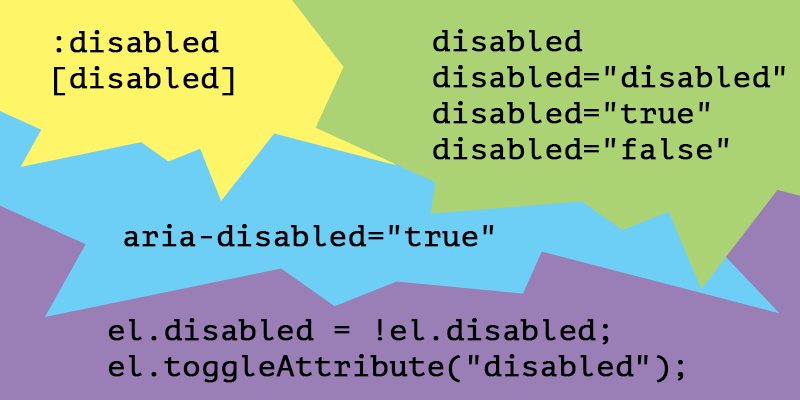
<p>In this article, you’ll find out how to use the HTML <code class="language-plaintext highlighter-rouge">disabled</code> boolean attribute, toggle it with JavaScript and style disabled form controls.</p>

<p><img src="/dist/uploads/2020/02/disabled-form-controls.png" alt="Disabled form controls using HTML, CSS, JS and ARIA" /></p>

<!-- more -->

<h2 id="summary">Summary</h2>

<ul>
  <li><a href="#the-html-disabled-boolean-attribute">The HTML <code class="language-plaintext highlighter-rouge">disabled</code> boolean attribute</a>
    <ul>
      <li><a href="#disabled-fieldset">Disabled fieldset</a></li>
      <li><a href="#disabled--readonly"><code class="language-plaintext highlighter-rouge">disabled</code> != <code class="language-plaintext highlighter-rouge">readonly</code></a></li>
      <li><a href="#the-aria-disabled-attribute">The <code class="language-plaintext highlighter-rouge">aria-disabled</code> attribute</a></li>
    </ul>
  </li>
  <li><a href="#toggle-the-disabled-state-with-js">Toggle the <code class="language-plaintext highlighter-rouge">disabled</code> state with JS</a>
    <ul>
      <li><a href="#firing-events">Firing events</a></li>
    </ul>
  </li>
  <li><a href="#style-the-disabled-form-controls">Style the <code class="language-plaintext highlighter-rouge">disabled</code> form controls</a>
    <ul>
      <li><a href="#disabled-links">“disabled” links</a></li>
      <li><a href="#default-user-agent-disabled-styles">Default User Agent <code class="language-plaintext highlighter-rouge">disabled</code> styles</a></li>
    </ul>
  </li>
</ul>

<h2 id="the-html-disabled-boolean-attribute">The HTML <code class="language-plaintext highlighter-rouge">disabled</code> boolean attribute</h2>

<p>According to <a href="https://html.spec.whatwg.org/dev/form-control-infrastructure.html#attr-fe-disabled">WHATWG</a>, the HTML <code class="language-plaintext highlighter-rouge">disabled</code> attribute is supported by a limited group of HTML elements and by the newly introduced <a href="https://html.spec.whatwg.org/multipage/custom-elements.html#custom-elements-face-example">form-associated custom elements</a>:</p>

<ul>
  <li><code class="language-plaintext highlighter-rouge">button</code></li>
  <li><code class="language-plaintext highlighter-rouge">fieldset</code></li>
  <li><code class="language-plaintext highlighter-rouge">optgroup</code></li>
  <li><code class="language-plaintext highlighter-rouge">option</code></li>
  <li><code class="language-plaintext highlighter-rouge">select</code></li>
  <li><code class="language-plaintext highlighter-rouge">textarea</code></li>
  <li><code class="language-plaintext highlighter-rouge">input</code></li>
</ul>

<p>In this article we’ll be focusing on the basic <a href="/html-replaced-void-elements/">HTML elements</a> only, so here’s a checkbox input which has a <code class="language-plaintext highlighter-rouge">disabled</code> attribute:</p>

<figure class="highlight"><pre><code class="language-html" data-lang="html"><span class="nt">&lt;input</span> <span class="na">type=</span><span class="s">"checkbox"</span> <span class="na">id=</span><span class="s">"check"</span> <span class="na">name=</span><span class="s">"check"</span> <span class="na">disabled</span><span class="nt">&gt;</span>
<span class="nt">&lt;label</span> <span class="na">for=</span><span class="s">"check"</span><span class="nt">&gt;</span>Checkbox<span class="nt">&lt;/label&gt;</span></code></pre></figure>

<p>Note that setting a value for the <code class="language-plaintext highlighter-rouge">disabled</code> attribute is not really required, due to its <a href="https://html.spec.whatwg.org/multipage/common-microsyntaxes.html#boolean-attribute">boolean</a> logic. Therefore, considering the presence of a boolean attribute on an element, all the below values are redundant and the outcome is a <code class="language-plaintext highlighter-rouge">disabled</code> behavior anyway:</p>

<ul>
  <li><code class="language-plaintext highlighter-rouge">disabled="disabled"</code></li>
  <li><code class="language-plaintext highlighter-rouge">disabled="true"</code></li>
  <li><code class="language-plaintext highlighter-rouge">disabled="false"</code></li>
  <li><code class="language-plaintext highlighter-rouge">disabled="whatever"</code></li>
</ul>

<h3 id="disabled-fieldset">Disabled fieldset</h3>

<p>The HTML <code class="language-plaintext highlighter-rouge">fieldset</code> element is used to group several controls within a web form. If the boolean <code class="language-plaintext highlighter-rouge">disabled</code> attribute is set on the <code class="language-plaintext highlighter-rouge">fieldset</code>, then all the form controls contained within will become disabled too.</p>

<p>Here’s an example with both of the <a href="/form-controls-currentcolor-pseudo-elements/">form controls</a> being disabled due to being wrapped by a disabled <code class="language-plaintext highlighter-rouge">fieldset</code> element.</p>

<figure class="highlight"><pre><code class="language-html" data-lang="html"><span class="nt">&lt;form&gt;</span>
  <span class="nt">&lt;fieldset</span> <span class="na">disabled</span><span class="nt">&gt;</span>
    <span class="nt">&lt;legend&gt;</span>Disabled fieldset<span class="nt">&lt;/legend&gt;</span>
    <span class="nt">&lt;div&gt;</span>
      <span class="nt">&lt;label</span> <span class="na">for=</span><span class="s">"name"</span><span class="nt">&gt;</span>Name<span class="nt">&lt;/label&gt;</span>
      <span class="nt">&lt;input</span> <span class="na">type=</span><span class="s">"text"</span> <span class="na">id=</span><span class="s">"name"</span> <span class="na">value=</span><span class="s">"Chris"</span><span class="nt">&gt;</span>
    <span class="nt">&lt;/div&gt;</span>
    <span class="nt">&lt;div&gt;</span>
      <span class="nt">&lt;label</span> <span class="na">for=</span><span class="s">"pwd"</span><span class="nt">&gt;</span>Password<span class="nt">&lt;/label&gt;</span>
      <span class="nt">&lt;input</span> <span class="na">type=</span><span class="s">"password"</span> <span class="na">id=</span><span class="s">"pwd"</span> <span class="na">value=</span><span class="s">"topsecret"</span><span class="nt">&gt;</span>
    <span class="nt">&lt;/div&gt;</span>
  <span class="nt">&lt;/fieldset&gt;</span>
<span class="nt">&lt;/form&gt;</span></code></pre></figure>

<h3 id="disabled--readonly"><code class="language-plaintext highlighter-rouge">disabled</code> != <code class="language-plaintext highlighter-rouge">readonly</code></h3>

<p>Comparing to the <code class="language-plaintext highlighter-rouge">readonly</code> form controls, the <code class="language-plaintext highlighter-rouge">disabled</code> ones are not submitted within a form, therefore they are also ignored when it comes to <code class="language-plaintext highlighter-rouge">form</code> validation. Also, the <code class="language-plaintext highlighter-rouge">disabled</code> form controls are not focusable either.</p>

<h3 id="the-aria-disabled-attribute">The <code class="language-plaintext highlighter-rouge">aria-disabled</code> attribute</h3>

<blockquote>
  <p>If you can use a native HTML element or attribute with the semantics and behavior you require already built in, instead of re-purposing an element and adding an ARIA role, state or property to make it accessible, then do so.</p>

  <p>from <a href="https://www.w3.org/TR/using-aria/#rule1">W3C</a></p>
</blockquote>

<p>When using an HTML element, such as a <a href="https://html.spec.whatwg.org/#form-controls">form control</a>, which natively supports the <code class="language-plaintext highlighter-rouge">disabled</code> boolean attribute, you don’t need the <code class="language-plaintext highlighter-rouge">aria-disabled</code> attribute.</p>

<p>Steve Faulkner wrote a good piece on the <a href="https://codepen.io/stevef/post/short-note-on-the-disabled-attribute">disabled/aria-disabled attributes</a> so you should go check it out!</p>

<hr />

<h2 id="toggle-the-disabled-state-with-js">Toggle the <code class="language-plaintext highlighter-rouge">disabled</code> state with JS</h2>

<p>You can take advantage of the fact that the <a href="https://developer.mozilla.org/en-US/docs/Web/API/HTMLSelectElement/disabled"><code class="language-plaintext highlighter-rouge">.disabled</code> property</a> returns a boolean value so you can toggle it easily using the following:</p>

<figure class="highlight"><pre><code class="language-js" data-lang="js"><span class="kd">let</span> <span class="nx">el</span> <span class="o">=</span> <span class="nb">document</span><span class="p">.</span><span class="nx">querySelector</span><span class="p">(</span><span class="dl">"</span><span class="s2">.myFormControl</span><span class="dl">"</span><span class="p">);</span>
<span class="nx">el</span><span class="p">.</span><span class="nx">disabled</span> <span class="o">=</span> <span class="o">!</span><span class="nx">el</span><span class="p">.</span><span class="nx">disabled</span><span class="p">;</span></code></pre></figure>

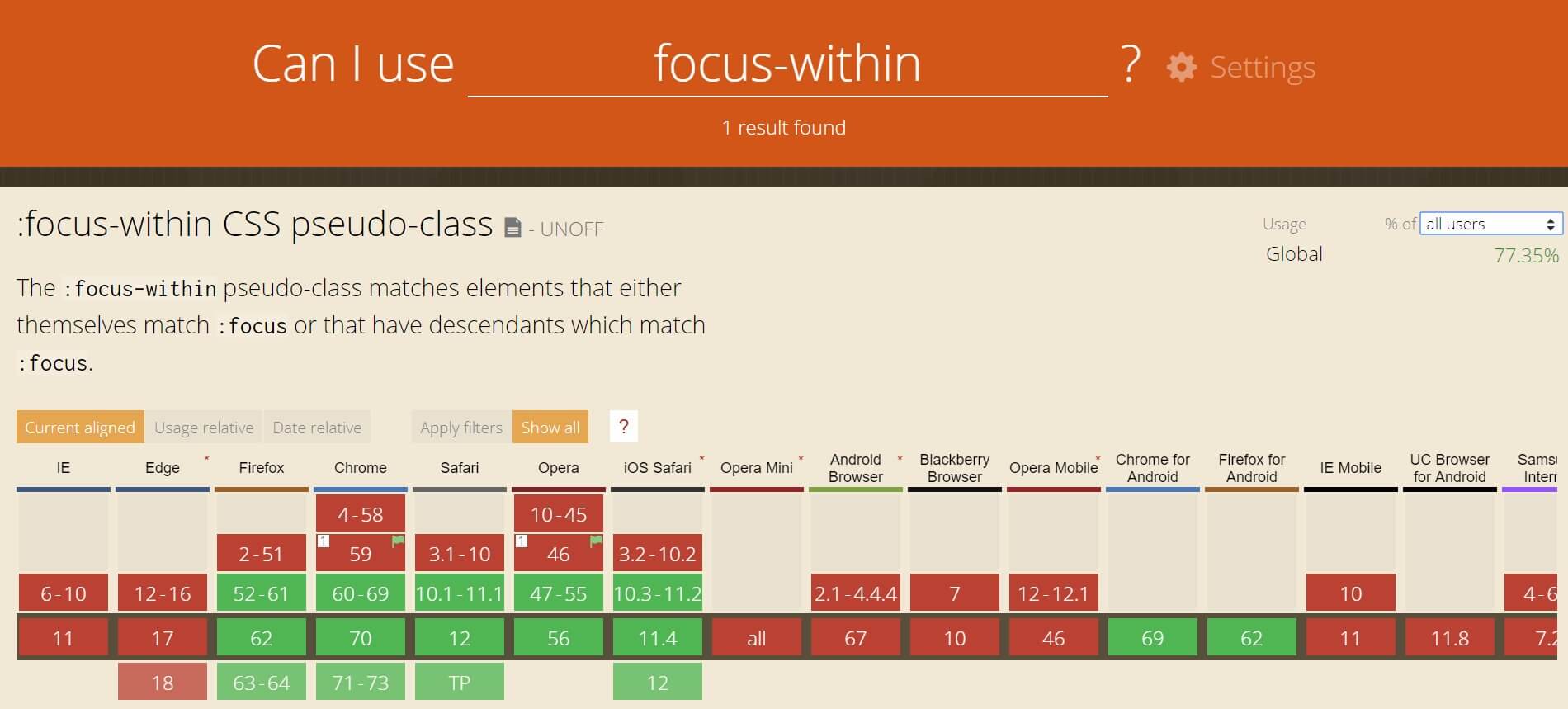
<p>Also, besides the classic <code class="language-plaintext highlighter-rouge">removeAttribute()</code> and <code class="language-plaintext highlighter-rouge">setAttribute()</code> methods, you can use the <code class="language-plaintext highlighter-rouge">toggleAttribute()</code> method to toggle the <code class="language-plaintext highlighter-rouge">disabled</code> attribute or any other boolean attribute. Although the <a href="https://caniuse.com/#feat=mdn-api_element_toggleattribute">browser support</a> is not perfect, this might come in handy:</p>

<figure class="highlight"><pre><code class="language-js" data-lang="js"><span class="kd">let</span> <span class="nx">el</span> <span class="o">=</span> <span class="nb">document</span><span class="p">.</span><span class="nx">querySelector</span><span class="p">(</span><span class="dl">"</span><span class="s2">.myFormControl</span><span class="dl">"</span><span class="p">);</span>
<span class="nx">el</span><span class="p">.</span><span class="nx">toggleAttribute</span><span class="p">(</span><span class="dl">"</span><span class="s2">disabled</span><span class="dl">"</span><span class="p">);</span></code></pre></figure>

<h3 id="firing-events">Firing events</h3>

<p>Speaking of disabled elements and JavaScript, Jake Archibald wrote an interesting piece on <a href="https://jakearchibald.com/2017/events-and-disabled-form-fields/">firing events on disabled form controls</a>, in which he argues about the need to use <code class="language-plaintext highlighter-rouge">pointer-events: none</code> on all the <code class="language-plaintext highlighter-rouge">:disabled</code> elements.</p>

<p>With better <a href="https://caniuse.com/#feat=mdn-css_selectors_is">browser support for the <code class="language-plaintext highlighter-rouge">:is()</code></a> (formerly <code class="language-plaintext highlighter-rouge">:any()</code> or <code class="language-plaintext highlighter-rouge">:matches()</code>, as <a href="https://twitter.com/SelenIT2/status/1230027841720463360">@SelenIT2 pointed out</a>) CSS pseudo-class, here’s how we could write a bulletproof CSS rule, to prevent interaction and event issues on the disabled form controls:</p>

<figure class="highlight"><pre><code class="language-css" data-lang="css"><span class="nd">:disabled:is</span><span class="o">(</span>
<span class="nt">button</span><span class="o">,</span>
<span class="nt">optgroup</span><span class="o">,</span>
<span class="nt">option</span><span class="o">,</span>
<span class="nt">select</span><span class="o">,</span>
<span class="nt">textarea</span><span class="o">,</span>
<span class="nt">input</span>
<span class="o">)</span> <span class="p">{</span>
  <span class="nl">pointer-events</span><span class="p">:</span> <span class="nb">none</span><span class="p">;</span>
<span class="p">}</span></code></pre></figure>

<p>The <code class="language-plaintext highlighter-rouge">fieldset</code> element is excluded in the above rule in order to avoid breaking other elements or <code class="language-plaintext highlighter-rouge">title</code> attributes wrapped within it.</p>

<hr />

<h2 id="style-the-disabled-form-controls">Style the <code class="language-plaintext highlighter-rouge">disabled</code> form controls</h2>

<p>There are two ways to select a disabled element using CSS:</p>

<ul>
  <li>
    <p>The old <code class="language-plaintext highlighter-rouge">[disabled]</code> attribute selector can be used for any HTML element user that has a <code class="language-plaintext highlighter-rouge">disabled</code> attribute, and it doesn’t really have to be a form control element.</p>
  </li>
  <li>
    <p>The <code class="language-plaintext highlighter-rouge">:disabled</code> pseudo-class, introduced in <a href="https://www.w3.org/TR/selectors-3/">Selectors Level 3</a>, is the preferred method to select a disabled element, due to the fact it matches HTML elements that support the <code class="language-plaintext highlighter-rouge">disabled</code> attribute only.</p>
  </li>
</ul>

<h3 id="disabled-links">“disabled” links</h3>

<p>Links are not <code class="language-plaintext highlighter-rouge">button</code>s, neither <code class="language-plaintext highlighter-rouge">div</code>s, <code class="language-plaintext highlighter-rouge">span</code>s or whatever. Still, an <code class="language-plaintext highlighter-rouge">a</code> element can act as a placeholder link when it’s used without its <code class="language-plaintext highlighter-rouge">href</code> attribute.</p>

<blockquote>
  <p>If the <code class="language-plaintext highlighter-rouge">a</code> element has no href attribute, then the element represents a placeholder for where a link might otherwise have been placed.</p>

  <p>From <a href="https://html.spec.whatwg.org/#the-a-element">WHATWG</a></p>
</blockquote>

<p>We know that the <code class="language-plaintext highlighter-rouge">:disabled</code> CSS pseudo-class only applies to form controls that natively support a <code class="language-plaintext highlighter-rouge">disabled</code> attribute and the <code class="language-plaintext highlighter-rouge">a</code> element is not among them.</p>

<p>Therefore, the following <a href="/things-you-should-know-about-css-anatomy/">CSS rule</a> contains both the <code class="language-plaintext highlighter-rouge">[disabled]</code> attribute selector and the <code class="language-plaintext highlighter-rouge">.disabled</code> class selector. You know, just in case you want, need, or have to use <code class="language-plaintext highlighter-rouge">&lt;a disabled&gt;...&lt;/a&gt;</code> instead of <code class="language-plaintext highlighter-rouge">&lt;a class="disabled"&gt;...&lt;/a&gt;</code> in a certain situation.</p>

<figure class="highlight"><pre><code class="language-css" data-lang="css"><span class="nc">.disabled</span><span class="o">,</span>
<span class="o">[</span><span class="nt">disabled</span><span class="o">]</span> <span class="p">{</span>
  <span class="nl">pointer-events</span><span class="p">:</span> <span class="nb">none</span><span class="p">;</span>
  <span class="nl">cursor</span><span class="p">:</span> <span class="n">not-allowed</span><span class="p">;</span>
  <span class="nl">opacity</span><span class="p">:</span> <span class="m">.7</span><span class="p">;</span>
<span class="p">}</span></code></pre></figure>

<p>If you’re wondering why would you even <em>disable</em> link elements, there is a scenario I’m having in mind and I’m sure you also did stumble upon this before:</p>

<p>Let’s say you have an active item within a navigation, showing it’s the active URL in that navigation. Now, besides the <em>active</em> styles applied to it, you might also want to prevent the user clicking and refreshing that already active page he’s on.</p>

<h3 id="default-user-agent-disabled-styles">Default User Agent <code class="language-plaintext highlighter-rouge">disabled</code> styles</h3>
<p>In case you’re wondering where all those default disabled styles come from, here’s a list with the most popular User Agent styles, feel free to dive in:</p>

<ul>
  <li><a href="https://cs.chromium.org/chromium/src/third_party/blink/renderer/core/html/resources/html.css">Chromium</a></li>
  <li><a href="https://hg.mozilla.org/mozilla-central/file/tip/layout/style/res/html.css">Mozilla</a></li>
  <li><a href="https://trac.webkit.org/browser/trunk/Source/WebCore/css/html.css">WebKit</a></li>
</ul>

<h2 id="conclusion">Conclusion</h2>

<ul>
  <li>The IE 11 and below don’t fully support the boolean <code class="language-plaintext highlighter-rouge">disabled</code> attribute on a <code class="language-plaintext highlighter-rouge">fieldset</code>.</li>
  <li>When adding the CSS <code class="language-plaintext highlighter-rouge">pointer-events: none</code> declaration to a link, in an attempt to <em>disable</em> it, you should also think of applying <code class="language-plaintext highlighter-rouge">tabindex="-1"</code> in order to take it out of the tab order.</li>
  <li>There is no good reason to use the CSS <code class="language-plaintext highlighter-rouge">[disabled]</code> attribute selector in favor of the <code class="language-plaintext highlighter-rouge">:disabled</code> pseudo-class. Perhaps needing IE6 - IE8 support and that’s definitely not a good reason.</li>
  <li>Comparing to the boolean <code class="language-plaintext highlighter-rouge">disabled</code> attribute, the <code class="language-plaintext highlighter-rouge">aria-disabled</code>, when set as an attribute, does require a value of either <code class="language-plaintext highlighter-rouge">true</code> or <code class="language-plaintext highlighter-rouge">false</code>.</li>
  <li>If <code class="language-plaintext highlighter-rouge">aria-disabled="false"</code> is set on a form control along with the <code class="language-plaintext highlighter-rouge">disabled</code> attribute, then the latter has greater <em>specificity</em>  and the <code class="language-plaintext highlighter-rouge">aria-disabled</code> attribute gets ignored.</li>
</ul>]]></content><author><name>Red</name></author><category term="HTML" /><category term="CSS" /><category term="JS" /><summary type="html"><![CDATA[Find out how to use the HTML disabled boolean attribute, toggle it with JavaScript and style disabled form controls.]]></summary></entry><entry><title type="html">HTML replaced and void elements</title><link href="https://catalin.red/html-replaced-void-elements/" rel="alternate" type="text/html" title="HTML replaced and void elements" /><published>2020-02-10T10:00:00+00:00</published><updated>2020-02-10T10:00:00+00:00</updated><id>https://catalin.red/html-replaced-void-elements</id><content type="html" xml:base="https://catalin.red/html-replaced-void-elements/"><![CDATA[<p>There is some confusion when it comes to HTML replaced elements and void elements, because some of the replaced elements, such as <code class="language-plaintext highlighter-rouge">img</code> and <code class="language-plaintext highlighter-rouge">input</code>, are part of the void elements set as well.</p>

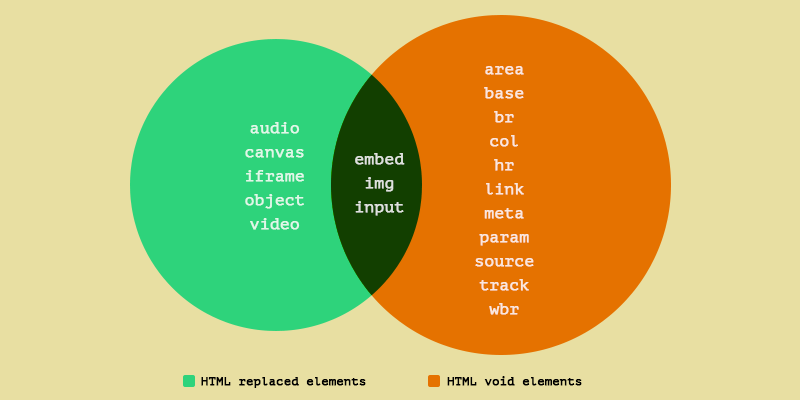
<p>With that in mind, I thought about a Venn diagram that does the job perfectly when it comes to represent and visualize the intersection between these two sets of HTML replaced and void elements.</p>

<p><img src="/dist/uploads/2020/02/html-replaced-void-elements-venn.png" alt="A Venn diagram with replaced and void elements in HTML" /></p>

<!-- more -->

<h2 id="summary">Summary</h2>
<ul>
  <li><a href="#html-replaced-elements">HTML replaced elements</a>
    <ul>
      <li><a href="#anonymous-replaced-elements">Anonymous replaced elements</a></li>
      <li><a href="#css-properties-that-apply-only-to-html-replaced-elements">CSS properties that apply only to HTML replaced elements</a></li>
      <li><a href="#300x150px-default-size">300x150px default size</a></li>
      <li><a href="#when-the-img-is-not-a-replaced-element">When the <code class="language-plaintext highlighter-rouge">img</code> is not a replaced element</a></li>
      <li><a href="#custom-checkbox-and-radio-inputs">Custom checkbox and radio <code class="language-plaintext highlighter-rouge">input</code>s</a></li>
    </ul>
  </li>
  <li><a href="#html-void-elements">HTML void elements</a>
    <ul>
      <li><a href="#xhtml-specific-forward-slash">XHTML-specific forward slash</a></li>
    </ul>
  </li>
  <li><a href="#random-tidbits">Random tidbits</a></li>
</ul>

<h3 id="html-replaced-elements">HTML replaced elements</h3>

<p>According to <a href="https://drafts.csswg.org/css-display/#replaced-element">W3C</a>, an HTML replaced element is an element whose content is outside the scope of the CSS formatting model. An example is the HTML <code class="language-plaintext highlighter-rouge">img</code> element, whose content is replaced by the image that its <code class="language-plaintext highlighter-rouge">src</code> attribute designates.</p>

<p>Oh, and the <code class="language-plaintext highlighter-rouge">img</code> element is one of the HTML void elements too.</p>

<p><img src="/dist/uploads/2020/02/html-img-replaced-element.png" alt="An img as an HTML replaced element" /></p>

<p>Neither CSS nor HTML standards didn’t define before which elements are replaced. So back in 2012, after gathering input from some really awesome people, I did wrote about <a href="/css-generated-content-replaced-elements/">CSS content on HTML replaced elements</a>, namely how the <code class="language-plaintext highlighter-rouge">::before</code> and <code class="language-plaintext highlighter-rouge">::after</code> pseudo-elements should work on HTML replaced elements.</p>

<p>Here’s the list of HTML elements that can be replaced elements, according to the <a href="https://html.spec.whatwg.org/multipage/rendering.html#replaced-elements">WHATWG</a>:</p>

<ul>
  <li><code class="language-plaintext highlighter-rouge">audio</code></li>
  <li><code class="language-plaintext highlighter-rouge">canvas</code></li>
  <li><code class="language-plaintext highlighter-rouge">embed</code></li>
  <li><code class="language-plaintext highlighter-rouge">iframe</code></li>
  <li><code class="language-plaintext highlighter-rouge">img</code></li>
  <li><code class="language-plaintext highlighter-rouge">input</code></li>
  <li><code class="language-plaintext highlighter-rouge">object</code></li>
  <li><code class="language-plaintext highlighter-rouge">video</code></li>
</ul>

<h3 id="anonymous-replaced-elements">Anonymous replaced elements</h3>

<blockquote>
  <p>Objects inserted using the CSS content property are anonymous replaced elements. They are “anonymous” because they don’t exist in the HTML markup.</p>

  <p><em>from <a href="https://developer.mozilla.org/en-US/docs/Web/CSS/Replaced_element">MDN</a></em></p>
</blockquote>

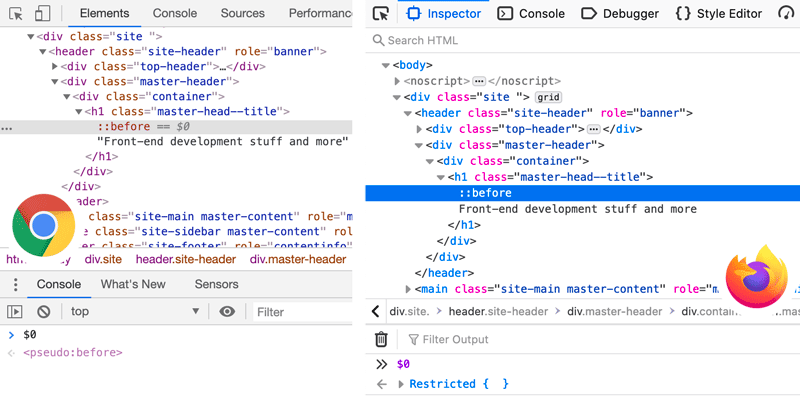
<p>I did stumble upon this while writing on how to get the <a href="/current-dom-node-console/#0-on-css-pseudo-elements-in-the-dom">current DOM node in browser’s console</a> but didn’t actually know they are called anonymous replaced elements. So, you can run <code class="language-plaintext highlighter-rouge">$0</code> on <a href="/before-after-pseudo-elements/">CSS pseudo-elements</a> in the DOM, because the <code class="language-plaintext highlighter-rouge">::before</code> and <code class="language-plaintext highlighter-rouge">::after</code> pseudo-elements are displayed in browsers’ elements tree.</p>

<h3 id="css-properties-that-apply-only-to-html-replaced-elements">CSS properties that apply only to HTML replaced elements</h3>

<p>The <code class="language-plaintext highlighter-rouge">object-fit</code> and <code class="language-plaintext highlighter-rouge">object-position</code> are two CSS properties that apply only to the HTML replaced elements:</p>

<ul>
  <li><a href="https://developer.mozilla.org/en-US/docs/Web/CSS/object-fit"><code class="language-plaintext highlighter-rouge">object-fit</code></a> specifies how the contents of an HTML replaced element should be fitted to the box established by its used height and width.</li>
  <li><a href="https://developer.mozilla.org/en-US/docs/Web/CSS/object-position"><code class="language-plaintext highlighter-rouge">object-position</code></a> determines the alignment of the replaced element inside its box.</li>
</ul>

<h3 id="300x150px-default-size">300x150px default size</h3>

<p>The default size for some of the HTML replaced elements, like <code class="language-plaintext highlighter-rouge">iframe</code> or <code class="language-plaintext highlighter-rouge">object</code>, is <code class="language-plaintext highlighter-rouge">300</code> pixels wide and <code class="language-plaintext highlighter-rouge">150</code> pixels tall.</p>

<ul>
  <li><a href="https://www.w3.org/TR/CSS22/visudet.html#inline-replaced-width">Inline, replaced elements width</a></li>
  <li><a href="https://www.w3.org/TR/CSS22/visudet.html#inline-replaced-height">Inline, replaced elements height</a></li>
</ul>

<h3 id="when-the-img-is-not-a-replaced-element">When the <code class="language-plaintext highlighter-rouge">img</code> is not a replaced element</h3>

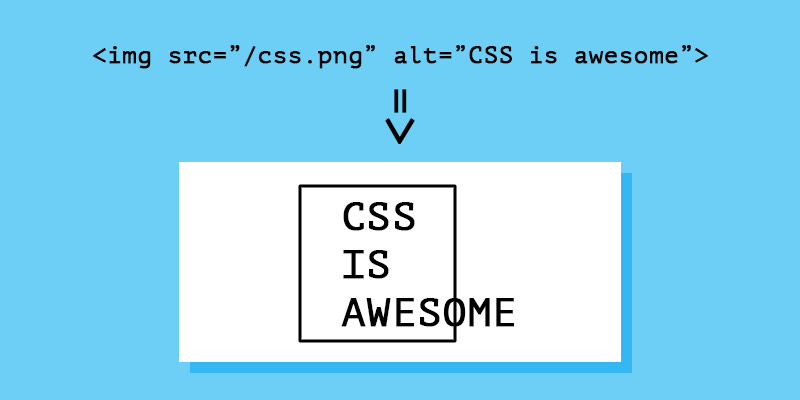
<p>Even if the <code class="language-plaintext highlighter-rouge">img</code> is considered and therefore listed as a replaced element, when the <code class="language-plaintext highlighter-rouge">img</code> is rendered as its <code class="language-plaintext highlighter-rouge">alt</code> attribute text, that <code class="language-plaintext highlighter-rouge">img</code> no longer acts like a replaced element.</p>

<p>Therefore, it is possible to use CSS pseudo-elements in order to style the <code class="language-plaintext highlighter-rouge">img</code> element when its source image has failed to load. Here’s an <a href="https://bitsofco.de/styling-broken-images/">article</a> on how to style broken images, by Ire Aderinokun.</p>

<h3 id="custom-checkbox-and-radio-inputs">Custom checkbox and radio <code class="language-plaintext highlighter-rouge">input</code>s</h3>

<p>Within the WHATWG <a href="https://html.spec.whatwg.org/">table of contents</a>, the form controls are listed under the non-replaced elements. The main reason the <code class="language-plaintext highlighter-rouge">input</code> element can be considered a replaced element is due to the fact that <code class="language-plaintext highlighter-rouge">input</code>s with <code class="language-plaintext highlighter-rouge">image</code> type attributes are replaced elements similar to <code class="language-plaintext highlighter-rouge">img</code>.</p>

<p>This means that using <code class="language-plaintext highlighter-rouge">::before</code> and <code class="language-plaintext highlighter-rouge">::after</code> pseudo-elements on <code class="language-plaintext highlighter-rouge">&lt;input type="checkbox/radio"&gt;</code> is allowed, according to the current standards.</p>

<ul>
  <li><a href="https://codepen.io/jensimmons/pen/KKPzxJa">Checkbox</a> and <a href="https://codepen.io/jensimmons/pen/JjPXeqN">radio</a> custom styles, by Jen Simmons</li>
  <li><a href="https://scottaohara.github.io/a11y_styled_form_controls/">Styled Form Controls</a> by Scott O’Hara</li>
  <li><a href="https://adrianroselli.com/2017/05/under-engineered-custom-radio-buttons-and-checkboxen.html">Custom Radio Buttons and Checkboxes</a> by Adrian Roselli</li>
  <li><a href="https://getbootstrap.com/docs/4.5/components/forms/#checkboxes-and-radios-1">Bootstrap checkboxes and radios</a></li>
</ul>

<hr />

<h2 id="html-void-elements">HTML void elements</h2>

<p>To better explain HTML void elements, we should point out first what tags are. When it comes to the HTML <a href="/things-you-should-know-about-css-anatomy/">anatomy</a>, first of all, tags are not elements, as this is a pretty common misunderstanding. The tags are meant to delimit the start and end of elements in the markup.</p>

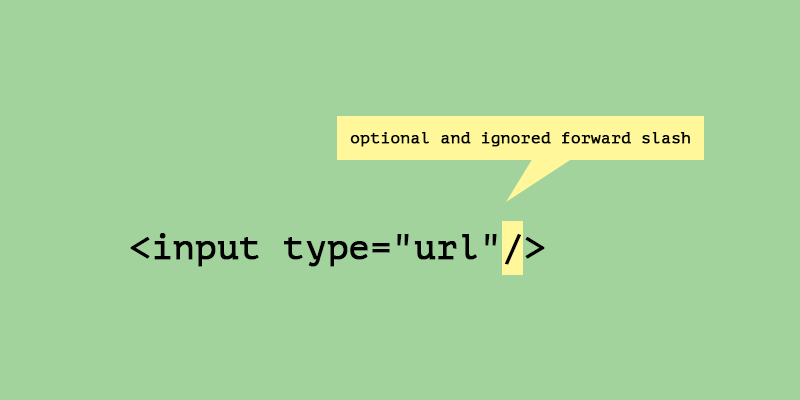
<p>The HTML void elements don’t have a proper end tag, therefore they can’t have any kind of content between the start tag and the end tag.</p>

<p><img src="/dist/uploads/2020/02/html-input-void-element.png" alt="An URL input as an HTML void element" /></p>

<p><em>Void elements only have a start tag e.g. <code class="language-plaintext highlighter-rouge">&lt;input type="url"&gt;</code>.</em></p>

<p>Here’s the list of void elements, according to <a href="https://html.spec.whatwg.org/multipage/syntax.html#elements-2">WHATWG</a>:</p>

<ol>
  <li><code class="language-plaintext highlighter-rouge">area</code></li>
  <li><code class="language-plaintext highlighter-rouge">base</code></li>
  <li><code class="language-plaintext highlighter-rouge">br</code></li>
  <li><code class="language-plaintext highlighter-rouge">col</code></li>
  <li><code class="language-plaintext highlighter-rouge">embed</code></li>
  <li><code class="language-plaintext highlighter-rouge">hr</code></li>
  <li><code class="language-plaintext highlighter-rouge">img</code></li>
  <li><code class="language-plaintext highlighter-rouge">input</code></li>
  <li><code class="language-plaintext highlighter-rouge">link</code></li>
  <li><code class="language-plaintext highlighter-rouge">meta</code></li>
  <li><code class="language-plaintext highlighter-rouge">param</code></li>
  <li><code class="language-plaintext highlighter-rouge">source</code></li>
  <li><code class="language-plaintext highlighter-rouge">track</code></li>
  <li><code class="language-plaintext highlighter-rouge">wbr</code></li>
</ol>

<h3 id="xhtml-specific-forward-slash">XHTML-specific forward slash</h3>

<p>It often happens to see void elements in the wild with a <em>closing</em> forward slash like <code class="language-plaintext highlighter-rouge">&lt;br/&gt;</code> or even with an extra space e.g. <code class="language-plaintext highlighter-rouge">&lt;br /&gt;</code>, which is specific to the XHTML syntax. For better compatibility with XHTML, the slash is allowed on void elements by the HTML specification, therefore the document passes the <a href="https://validator.w3.org/">markup validation</a>.</p>

<p>As a side note, depending on the <a href="https://html.spec.whatwg.org/multipage/syntax.html#elements-2">type of the HTML element</a> here’s what the forward slash does on <code class="language-plaintext highlighter-rouge">&lt;foo/&gt;</code>:</p>

<ul>
  <li>If <code class="language-plaintext highlighter-rouge">foo</code> is a void element, then the <code class="language-plaintext highlighter-rouge">/</code> gets ignored.</li>
  <li>If <a href="https://html.spec.whatwg.org/multipage/syntax.html#foreign-elements">foreign element</a>, meaning an element from the MathML namespace and the SVG namespace, e.g. <code class="language-plaintext highlighter-rouge">&lt;defs/&gt;</code> within an inline SVG, then the self-closing syntax is valid.</li>
  <li>If any other HTML element type, other than above, the browsers will ignore the slash and will treat it as a start tag, e.g. <code class="language-plaintext highlighter-rouge">&lt;foo&gt;</code>. Usually, this leads to a mess in your markup as the siblings are now considered children of the <code class="language-plaintext highlighter-rouge">foo</code> element.</li>
</ul>

<h2 id="random-tidbits">Random tidbits</h2>

<p>Here’s what I noticed, after lurking through W3C, WHATWG and MDN docs, old issues and forgotten corners of the web:</p>

<ul>
  <li>
    <p>The void elements are often called empty elements, single elements, stand-alone elements, unpaired elements or <em>singleton</em> elements. Yes, singleton, the design pattern, because I guess that’s what happens when Java programmers start writing HTML.</p>
  </li>
  <li>
    <p>Both <a href="https://www.w3.org/TR/html52/syntax.html">W3C</a> and <a href="https://developer.mozilla.org/en-US/docs/Web/HTML/Element">MDN</a> list the HTML elements as if they are start tags e.g. <code class="language-plaintext highlighter-rouge">U+003C</code>(<code class="language-plaintext highlighter-rouge">&lt;</code>), tag name (element’s name) and <code class="language-plaintext highlighter-rouge">U+003E</code>(<code class="language-plaintext highlighter-rouge">&gt;</code>), while <a href="https://html.spec.whatwg.org/multipage/syntax.html">WHATWG</a> seems to do it the right way.</p>
  </li>
  <li>
    <p>Within the MDN docs, the void elements are referred solely as <a href="https://developer.mozilla.org/en-US/docs/Glossary/Empty_element"><em>empty</em> elements</a>, that cannot have any child nodes.</p>
  </li>
  <li>
    <p>It seems that Prettier and ESLint are still <a href="https://github.com/prettier/prettier/issues/5246#issuecomment-565585320"><em>fighting over void elements</em></a>, whether to close or not to close them.</p>
  </li>
  <li>
    <p>While <a href="https://html.spec.whatwg.org/multipage/rendering.html#replaced-elements">WHATWG</a> says that <code class="language-plaintext highlighter-rouge">audio</code>, <code class="language-plaintext highlighter-rouge">canvas</code>, <code class="language-plaintext highlighter-rouge">embed</code>, <code class="language-plaintext highlighter-rouge">iframe</code>, <code class="language-plaintext highlighter-rouge">img</code>, <code class="language-plaintext highlighter-rouge">input</code>, <code class="language-plaintext highlighter-rouge">object</code>, and <code class="language-plaintext highlighter-rouge">video</code> can be replaced elements, <a href="https://developer.mozilla.org/en-US/docs/Web/CSS/Replaced_element">MDN</a> list only <code class="language-plaintext highlighter-rouge">iframe</code>, <code class="language-plaintext highlighter-rouge">video</code>, <code class="language-plaintext highlighter-rouge">embed</code>, <code class="language-plaintext highlighter-rouge">img</code> as typical replaced elements while <code class="language-plaintext highlighter-rouge">option</code>, <code class="language-plaintext highlighter-rouge">audio</code>, <code class="language-plaintext highlighter-rouge">canvas</code>, <code class="language-plaintext highlighter-rouge">object</code> and <code class="language-plaintext highlighter-rouge">applet</code> are treated as replaced elements only in specific cases.</p>
  </li>
  <li>
    <p>I stumbled upon <a href="https://www.w3.org/Bugs/Public/show_bug.cgi?id=28904">this issue</a> on the need to add an exhaustive list of replaced elements <a href="https://html.spec.whatwg.org/multipage/rendering.html#replaced-elements">to the specs</a>. That <a href="https://github.com/whatwg/html/pull/2857">happened</a> eventually, it just took a bit longer.</p>
  </li>
  <li>
    <p>On the <a href="https://lists.w3.org/Archives/Public/www-archive/2014Apr/0034.html">W3C vs WHATWG</a> matter, hopefully, things are going in the right direction now, as in 2019, <a href="https://www.w3.org/blog/2019/05/w3c-and-whatwg-to-work-together-to-advance-the-open-web-platform/">W3C and the WHATWG have signed an agreement</a> to collaborate on the development of a single version of the HTML and DOM specifications.</p>
  </li>
</ul>

<h2 id="conclusion">Conclusion</h2>

<p>When in doubt over one or the other, either it’s a replaced or a void element, I hope the above Venn diagram will come in handy.</p>

<p>Oh, and always <a href="https://validator.w3.org/nu/">validate your markup</a>, it does miracles for your <code class="language-plaintext highlighter-rouge">body</code>!</p>]]></content><author><name>Red</name></author><category term="HTML" /><category term="CSS" /><summary type="html"><![CDATA[Learn more about the HTML replaced and void elements and visualize the intersection of these two HTML elements sets using a Venn diagram.]]></summary></entry><entry><title type="html">Light and dark themed SVG favicon using the CSS prefers-color-scheme media feature</title><link href="https://catalin.red/svg-favicon-light-dark-theme/" rel="alternate" type="text/html" title="Light and dark themed SVG favicon using the CSS prefers-color-scheme media feature" /><published>2020-02-03T10:00:00+00:00</published><updated>2020-02-03T10:00:00+00:00</updated><id>https://catalin.red/svg-favicon-light-dark-theme</id><content type="html" xml:base="https://catalin.red/svg-favicon-light-dark-theme/"><![CDATA[<p>In this article you’ll learn how to use an SVG as a favicon for your website, considering the light and dark theme detection in the browser using the CSS <code class="language-plaintext highlighter-rouge">prefers-color-scheme</code> media feature.</p>

<p><img src="/dist/uploads/2020/02/svg-favicon-light-dark-theme.png" alt="A website with SVG favicon for both light and dark themes" /></p>

<!-- more -->

<h2 id="summary">Summary</h2>
<ul>
  <li><a href="#how-to-add-a-favicon-to-your-website">How to add a favicon to your website</a></li>
  <li><a href="#light--dark-theme-detection-in-the-browser">Light &amp; Dark theme detection in the browser</a>
    <ul>
      <li><a href="#css-detection">CSS detection</a></li>
      <li><a href="#javascript-detection">JS detection</a></li>
    </ul>
  </li>
  <li><a href="#how-to-switch-the-svg-favicon-when-in-dark-mode">How to switch the SVG favicon when in Dark Mode</a></li>
  <li><a href="#browser-support-and-fallbacks">Browser support and fallbacks</a></li>
  <li><a href="#google-serp-and-favicons">Google SERP and favicons</a>
    <ul>
      <li><a href="#failed-serp-redesign">Failed SERP redesign</a></li>
      <li><a href="#dark-pattern-design-scenario">Dark pattern design scenario</a></li>
    </ul>
  </li>
</ul>

<h2 id="how-to-add-a-favicon-to-your-website">How to add a favicon to your website</h2>

<p>A favorites icon, also known as a favicon, is a tiny icon associated with a particular web site or web page that is displayed usually in browser’s address bar and bookmarks menu.</p>

<p>The favicon is used to improve the user experience and enforce a brand’s consistency. When a familiar favicon is seen in the browser’s address bar, for example, it helps users to know they are in the right place. This is how phishing in the browser usually succeeds but that’s a completely different story.</p>

<p>Here are the image formats you can use to add a favicon to your website. Spoiler alert: there is no <em>one-size-and-format</em> that fits in all the browsers. There would have been too easy!</p>

<ul>
  <li><strong>ICO</strong> - the ancient default</li>
  <li><strong>GIF</strong> - for when, you know, want to draw attention within a plethora of open tabs</li>
  <li><strong>PNG</strong> - all browsers support the .ico format but the PNG format might be handy</li>
  <li><strong>SVG</strong> - the higher resolution approach that has worse browser support but lots of potential</li>
</ul>

<p>In this article, we’ll be focusing on the latter approach that is based on using the Scalable Vector Graphics (SVG), as it teams up perfectly with the CSS <code class="language-plaintext highlighter-rouge">prefers-color-scheme</code> media feature.</p>

<h2 id="light--dark-theme-detection-in-the-browser">Light &amp; Dark theme detection in the browser</h2>

<p>We don’t know for sure yet why most developers prefer to use dark themes in general but some say it’s comfortable on the eyes while others find it more exciting. Also, there’s the category below:</p>

<blockquote>
  <p>― Why do programmers prefer dark mode? <br />
― Cause light attracts bugs.</p>
</blockquote>

<p><em>from <a href="https://www.reddit.com/r/Jokes/comments/edna99/why_do_programmers_prefer_dark_mode/">r/Jokes</a></em></p>

<h3 id="css-detection">CSS detection</h3>

<p>You can enable CSS theme mode detection with CSS <code class="language-plaintext highlighter-rouge">prefers-color-scheme</code> media feature, in order to add an alternative look and feel to your website with custom <a href="/things-you-should-know-about-css-anatomy/">CSS rules</a>:</p>

<figure class="highlight"><pre><code class="language-css" data-lang="css"><span class="k">@media</span> <span class="p">(</span><span class="n">prefers-color-scheme</span><span class="p">:</span> <span class="n">dark</span><span class="p">)</span> <span class="p">{</span>
  <span class="c">/* "Give yourself to the Dark Side" - Darth Vader */</span>
<span class="p">}</span></code></pre></figure>

<h3 id="javascript-detection">JavaScript detection</h3>

<p>According to <a href="https://developer.mozilla.org/en-US/docs/Web/API/Window/matchMedia">MDN</a>, the Window’s <code class="language-plaintext highlighter-rouge">matchMedia()</code> method returns an object that represents the result of the specified <a href="/things-you-should-know-about-css-anatomy/">media query</a> string.</p>

<p>The dark mode or dark theme has made its way to the main headlights for some time, so here’s how to detect <em>the darkness</em> with JavaScript:</p>

<figure class="highlight"><pre><code class="language-js" data-lang="js"><span class="k">if</span> <span class="p">(</span><span class="nb">window</span><span class="p">.</span><span class="nx">matchMedia</span> <span class="o">&amp;&amp;</span>
    <span class="nb">window</span><span class="p">.</span><span class="nx">matchMedia</span><span class="p">(</span><span class="dl">'</span><span class="s1">(prefers-color-scheme: dark)</span><span class="dl">'</span><span class="p">).</span><span class="nx">matches</span><span class="p">)</span> <span class="p">{</span>
  <span class="c1">// “Fear is the path to the Dark Side" - Yoda</span>
<span class="p">}</span></code></pre></figure>

<p>Although the above is a possible and working solution for switching the favicon in the HTML, I wouldn’t recommend it, as now you can do that without JavaScript at all.</p>

<h2 id="how-to-switch-the-svg-favicon-when-in-dark-mode">How to switch the SVG favicon when in Dark Mode</h2>

<p>First, add the SVG favicon to your HTML <code class="language-plaintext highlighter-rouge">&lt;head&gt;</code> section:</p>

<figure class="highlight"><pre><code class="language-html" data-lang="html"><span class="nt">&lt;link</span> <span class="na">rel=</span><span class="s">"icon"</span> <span class="na">href=</span><span class="s">"/favicon.svg"</span> <span class="na">type=</span><span class="s">"image/svg+xml"</span><span class="nt">&gt;</span></code></pre></figure>

<p>Regarding the SVG <code class="language-plaintext highlighter-rouge">favicon.svg</code>’s inner content, below is a rough example of an SVG rectangle with rounded corners, which has a different color, depending on the active theme. The detection is made using the above CSS <code class="language-plaintext highlighter-rouge">prefers-color-scheme</code> media feature.</p>

<figure class="highlight"><pre><code class="language-html" data-lang="html"><span class="nt">&lt;svg</span> <span class="na">width=</span><span class="s">"50"</span> <span class="na">height=</span><span class="s">"50"</span> <span class="na">viewBox=</span><span class="s">"0 0 50 50"</span> <span class="na">xmlns=</span><span class="s">"http://www.w3.org/2000/svg"</span><span class="nt">&gt;</span>
  <span class="nt">&lt;style&gt;</span>
    <span class="nt">rect</span> <span class="p">{</span>
      <span class="py">fill</span><span class="p">:</span> <span class="no">green</span><span class="p">;</span>
    <span class="p">}</span>
    <span class="k">@media</span> <span class="p">(</span><span class="n">prefers-color-scheme</span><span class="p">:</span> <span class="n">dark</span><span class="p">)</span> <span class="p">{</span>
      <span class="nt">rect</span> <span class="p">{</span>
        <span class="py">fill</span><span class="p">:</span> <span class="no">red</span><span class="p">;</span>
      <span class="p">}</span>
    <span class="p">}</span>
  <span class="nt">&lt;/style&gt;</span>
  <span class="nt">&lt;rect</span> <span class="na">width=</span><span class="s">"50"</span> <span class="na">height=</span><span class="s">"50"</span> <span class="na">rx=</span><span class="s">"5"</span><span class="nt">/&gt;</span>
<span class="nt">&lt;/svg&gt;</span></code></pre></figure>

<h2 id="browser-support-and-fallbacks">Browser support and fallbacks</h2>

<p>Considering the current <a href="https://caniuse.com/#feat=link-icon-svg">browser support for the SVG favicon</a>, a fallback is required. In this case, we serve the PNG format when the browser fails to accept SVG as a favicon.</p>

<blockquote>
  <p>If the user agent tries to use an icon but that icon is determined, upon closer examination, to in fact be inappropriate (e.g. because it uses an unsupported format), then the user agent must try the next-most-appropriate icon as determined by the attributes.</p>
</blockquote>

<p><em>from <a href="https://html.spec.whatwg.org/multipage/links.html#rel-icon">WHATWG</a> docs</em></p>

<p>The common approach when it comes to older browsers that support neither the PNG favicon format is to keep a <code class="language-plaintext highlighter-rouge">favicon.ico</code> file in the root. Careful not to <code class="language-plaintext highlighter-rouge">&lt;link&gt;</code> to it within the <code class="language-plaintext highlighter-rouge">&lt;head&gt;</code> section at all because doing that will result in browsers <em>picking</em> the <code class="language-plaintext highlighter-rouge">favicon.ico</code> as the default.</p>

<figure class="highlight"><pre><code class="language-html" data-lang="html"><span class="nt">&lt;link</span> <span class="na">rel=</span><span class="s">"icon"</span> <span class="na">href=</span><span class="s">"/favicon.svg"</span> <span class="na">type=</span><span class="s">"image/svg+xml"</span><span class="nt">&gt;</span>
<span class="nt">&lt;link</span> <span class="na">rel=</span><span class="s">"icon"</span> <span class="na">href=</span><span class="s">"/favicon.png"</span> <span class="na">type=</span><span class="s">"image/png"</span><span class="nt">&gt;</span>
<span class="c">&lt;!-- favicon.ico in the root --&gt;</span></code></pre></figure>

<p>With that being said, after testing this in all the existing modern browsers, here is the order the browsers will look for the favicon, with the code above:</p>

<ol>
  <li>SVG (hopefully!)</li>
  <li>PNG (no worries, this is good too!)</li>
  <li>ICO (oh, here we go again!)</li>
</ol>

<p>Yes, lots of browsers, because we have to love them all!</p>

<p><img src="/dist/uploads/2020/02/modern-browsers-icons.png" alt="Modern browsers icons" /></p>

<h2 id="read-more">Read more</h2>

<p>You might want to read more on SVG, favicons and CSS media features:</p>

<ul>
  <li><a href="https://en.wikipedia.org/wiki/Favicon">Favicon - Wikipedia</a></li>
  <li><a href="https://blog.tomayac.com/2019/09/21/prefers-color-scheme-in-svg-favicons-for-dark-mode-icons/"><code class="language-plaintext highlighter-rouge">prefers-color-scheme</code> in SVG favicons for dark mode icons</a></li>
  <li><a href="https://web.dev/prefers-color-scheme/">prefers-color-scheme</a></li>
  <li><a href="https://jakearchibald.com/2016/svg-media-queries/">SVG &amp; media queries</a></li>
</ul>]]></content><author><name>Red</name></author><category term="HTML" /><category term="CSS" /><category term="JS" /><category term="A11Y" /><category term="SEO" /><summary type="html"><![CDATA[How to use an SVG as a favicon for your website, considering the light and dark theme detection in the browser using the CSS prefers-color-scheme media feature, with PNG and ICO fallbacks.]]></summary></entry><entry><title type="html">The current DOM node in browser’s console</title><link href="https://catalin.red/current-dom-node-console/" rel="alternate" type="text/html" title="The current DOM node in browser’s console" /><published>2020-01-27T10:00:00+00:00</published><updated>2020-01-27T10:00:00+00:00</updated><id>https://catalin.red/current-dom-node-console</id><content type="html" xml:base="https://catalin.red/current-dom-node-console/"><![CDATA[<p>When it comes to debugging in the browser’s console, getting the current DOM node, React and Vue.js components or current Angular scope are something I found very useful in my daily workflow.</p>

<p>In this article, you’ll learn how to get the current DOM node using <code class="language-plaintext highlighter-rouge">$0</code> in the browser’s console and what to expect when you run it on the CSS pseudo-elements displayed in the elements tree.</p>

<p><img src="/dist/uploads/2020/01/current-dom-node.png" alt="The current DOM node, React and Vue.js components or Angular scope in the browser console" /></p>

<!-- more -->

<h2 id="summary">Summary</h2>
<ul>
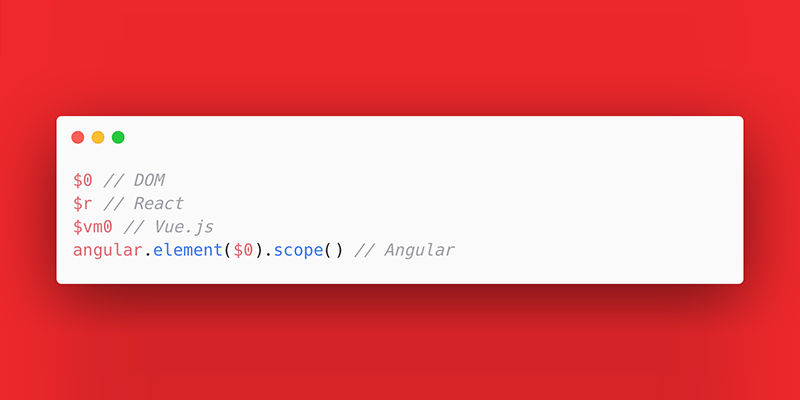
  <li><code class="language-plaintext highlighter-rouge">$0</code> returns the current DOM node. The same <code class="language-plaintext highlighter-rouge">$0</code> on CSS pseudo-elements in the DOM returns inconsistent results across different browsers.</li>
  <li><code class="language-plaintext highlighter-rouge">$r</code> returns the current React component.</li>
  <li><code class="language-plaintext highlighter-rouge">$vm0</code> returns the current Vue.js component.</li>
  <li><code class="language-plaintext highlighter-rouge">angular.element($0).scope()</code> returns the Angular scope that is bound to the current DOM node.</li>
</ul>

<h2 id="0"><code class="language-plaintext highlighter-rouge">$0</code></h2>

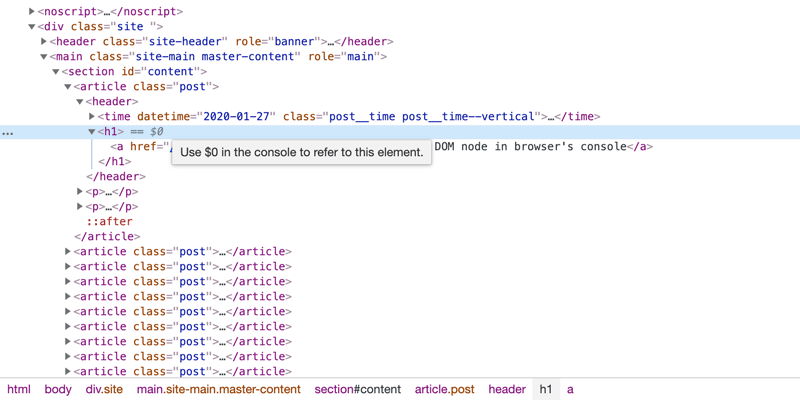
<p>When selecting a DOM element on a page, if you’re using Chrome, for example, you may have noticed the <code class="language-plaintext highlighter-rouge">== $0</code> in the elements tree next to the currently highlighted element. That means that typing <code class="language-plaintext highlighter-rouge">$0</code> in the console will give you access to the returned object’s properties and methods.</p>

<p><img src="/dist/uploads/2020/01/chrome-dom-tree-$0-console.png" alt="Chrome screenshot with title that says to use $0 in the console" /></p>

<p><em>In Chrome you can see <code class="language-plaintext highlighter-rouge">== $0</code> appended next to a selected DOM element and a title is displayed when you hover it.</em></p>

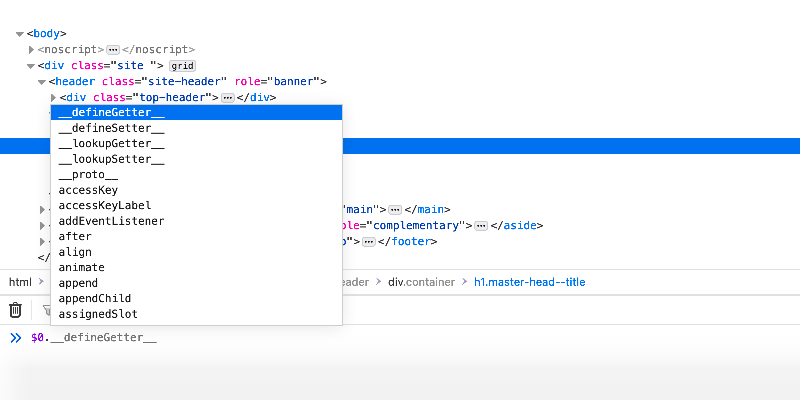
<p>Even though <code class="language-plaintext highlighter-rouge">$0</code> is not displayed in the DOM elements tab, as in Chrome DevTools, typing <code class="language-plaintext highlighter-rouge">$0</code> in the console works as expected in the other popular browsers too, as far as I tested.</p>

<p><img src="/dist/uploads/2020/01/firefox-$0-console-object.png" alt="Firefox screenshot with $0 ran in the DevTools console tab" /></p>

<p><em>Typing <code class="language-plaintext highlighter-rouge">$0</code> in the Firefox browser’s console, reveals the current object’s methods and properties.</em></p>

<h2 id="0-on-css-pseudo-elements-in-the-dom"><code class="language-plaintext highlighter-rouge">$0</code> on CSS pseudo-elements in the DOM</h2>

<p>Even though the CSS <code class="language-plaintext highlighter-rouge">::before</code> and <code class="language-plaintext highlighter-rouge">::after</code> pseudo-elements get displayed in browsers’ elements tree, they are not real DOM elements. Those elements are called <strong>pseudo</strong> because their content is generated by CSS, rather than HTML or JavaScript.</p>

<p>Pseudo-elements didn’t use to show up in the elements tree but now they do and I guess they’re not going to leave anywhere anytime soon. Having said that, if you abuse DOM element selection from browser’s Elements or Inspector tabs, there are some inconsistencies when it comes to what the console returns when typing <code class="language-plaintext highlighter-rouge">$0</code> on the pseudo-elements selection:</p>

<p><img src="/dist/uploads/2020/01/chrome-vs-firefox-$0-on-pseudo-element.png" alt="DevTools comparison between Chrome and Firefox on pseudo-elements" /></p>

<p><em>A DevTools comparison between Chrome and Firefox on pseudo-elements when it comes to trying to get the current DOM node with <code class="language-plaintext highlighter-rouge">$0</code> in the console.</em></p>

<p>You may notice the returned <code class="language-plaintext highlighter-rouge">Restricted {}</code> object shown in the Firefox console when trying to get the current DOM node, which is a pseudo-element. At first sight, it’s not that quite self-explanatory.</p>

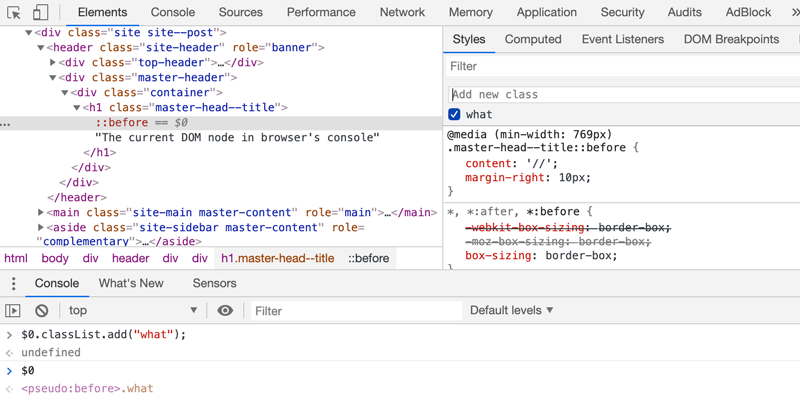
<p>Still, it seems that Firefox returns <code class="language-plaintext highlighter-rouge">Object {}</code>, <code class="language-plaintext highlighter-rouge">Inaccessible {}</code> or <code class="language-plaintext highlighter-rouge">Restricted {}</code> objects apparently due to <a href="https://developer.mozilla.org/en-US/docs/Mozilla/Gecko/Script_security#Cross-origin">script security reasons</a> while other browsers like Chrome for example even let you add a class on the current pseudo-elements nodes referred with <code class="language-plaintext highlighter-rouge">$0</code>: <code class="language-plaintext highlighter-rouge">$0.classList.add("what")</code>.</p>

<p><img src="/dist/uploads/2020/01/pseudo-element-class-on-current-node-chrome.png" alt="Chrome DevTools screenshot that shows you can add a class on the current pseudo-element" /></p>

<p><em>In Chrome DevTools, you can add a class on the currently selected CSS pseudo-element using the <code class="language-plaintext highlighter-rouge">classList</code> property and the <code class="language-plaintext highlighter-rouge">add()</code> method.</em></p>

<h2 id="reacts-r">React’s <code class="language-plaintext highlighter-rouge">$r</code></h2>

<p>When selecting a component in <a href="https://github.com/facebook/react/tree/master/packages/react-devtools">React DevTools</a> and write <code class="language-plaintext highlighter-rouge">$r</code> in the browser’s console, you get a reference to the selected component’s instance.</p>

<h2 id="vuejs-vm0">Vue.js’ <code class="language-plaintext highlighter-rouge">$vm0</code></h2>

<p>Similar to the above, if having installed the <a href="https://vuejs.org/v2/cookbook/debugging-in-vscode.html#Vue-Devtools">Vue.js devtools</a> to your browser, select the Vue component and then you’ll be able to interact with it in the browser’s console using <code class="language-plaintext highlighter-rouge">$vm0</code>.</p>

<h2 id="angulars-angularelement0scope">Angular’s <code class="language-plaintext highlighter-rouge">angular.element($0).scope()</code></h2>

<p>Similar to React and Vue.js components, in Angular, a scope is an object that contains the application data and methods. Using the <a href="https://github.com/angular/batarang">AngularJS Batarang</a> extension in your browser, you can use <code class="language-plaintext highlighter-rouge">angular.element($0).scope()</code> to get the Angular scope that is bound to the current DOM node <code class="language-plaintext highlighter-rouge">$0</code>.</p>

<h2 id="edge-extensions-and-devtools-naming-convention">Edge, extensions and DevTools naming convention</h2>

<ul>
  <li>
    <p>The newly released Edge browser supports extensions installed from other stores, e.g. Chrome Web Store, so that means that besides the well-known Chrome and Firefox support, now you get Microsoft Edge browser support too for the popular JavaScript frameworks.</p>
  </li>
  <li>
    <p>Note that selecting the React and Vue.js components or Angular current scope mostly works for applications that are built in development mode. In most cases, when the production mode is set as <code class="language-plaintext highlighter-rouge">true</code>, that is the intended behavior.</p>
  </li>
  <li>
    <p>The <em>DevTools</em> naming convention is unanimously used by most of the popular browsers when it comes to their integrated development tools. Oh, and there’s Safari that uses <em>Web Inspector</em>.</p>
  </li>
</ul>

<h2 id="browser-and-development-tools">Browser and development tools</h2>
<ul>
  <li><a href="https://developer.mozilla.org/en-US/docs/Tools/Page_Inspector/How_to/Use_the_Inspector_from_the_Web_Console">Firefox Developer Tools - Console</a></li>
  <li><a href="https://developers.google.com/web/tools/chrome-devtools/console/utilities#dom">Chrome DevTools - Console</a></li>
  <li><a href="https://docs.microsoft.com/en-us/microsoft-edge/devtools-guide/console">Microsoft Edge (EdgeHTML) Developer Tools - Console</a></li>
  <li><a href="https://developer.apple.com/safari/tools/">Safari Web Inspector</a></li>
  <li><a href="https://dev.opera.com/extensions/dev-tools/">Opera DevTools</a></li>
</ul>

<p>Also, if debugging is something you’re interested in, you’ll also like the <a href="/removing-an-element-with-plain-javascript-remove-method/"><code class="language-plaintext highlighter-rouge">vanilla JS remove()</code> method</a> and to fiddle with <a href="/copy-clipboard-js/">JS and the <code class="language-plaintext highlighter-rouge">Clipboard API</code></a>.</p>

<h2 id="update-on-2020-january-29">Update on <time datetime="2020-01-29">2020, January 29</time></h2>
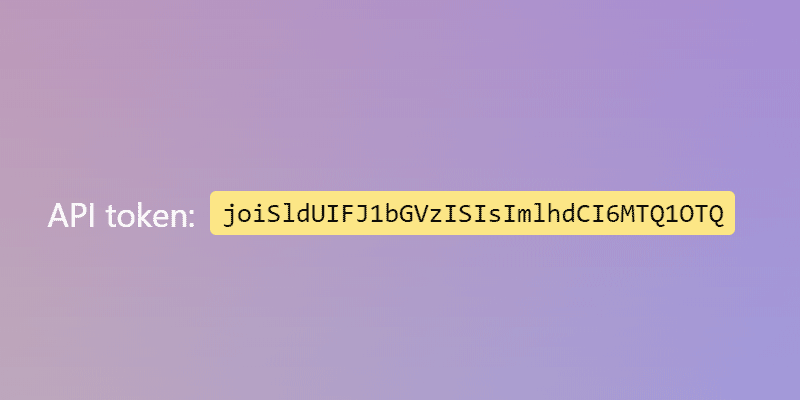
<p>While writing this article down, I also filled a <a href="https://bugs.chromium.org/p/chromium/issues/detail?id=1045857">bug report</a> for this Chrome DevTools behavior. Two days later, the <a href="https://twitter.com/catalinred/status/1222463986312060928">bug was fixed already</a> and I couldn’t be impressed more!</p>]]></content><author><name>Red</name></author><category term="JS" /><summary type="html"><![CDATA[Find out how to get the current DOM node, React and Vue.js components or current Angular scope in order to speed up debugging in the browser console.]]></summary></entry><entry><title type="html">How to copy to the clipboard using JS and the Clipboard API</title><link href="https://catalin.red/copy-clipboard-js/" rel="alternate" type="text/html" title="How to copy to the clipboard using JS and the Clipboard API" /><published>2020-01-20T10:00:00+00:00</published><updated>2020-01-20T10:00:00+00:00</updated><id>https://catalin.red/copy-clipboard-js</id><content type="html" xml:base="https://catalin.red/copy-clipboard-js/"><![CDATA[<p>The clipboard is a useful feature that helps to transfer data between a browser’s window to another one or to a different operating system application using operations like cut, copy, and paste. In this article, you’ll find out how to copy an API token to the clipboard using JS and the modern asynchronous Clipboard API.</p>

<p><img src="/dist/uploads/2020/01/clipboard-js.png" alt="An API token example you can copy with JS and Clipboard API" /></p>

<!-- more -->

<h2 id="how-to-copy-an-api-token">How to copy an API token</h2>

<p>A classic scenario we all met in the wild is to copy an API token from an account settings form. I had to implement a similar example in the past weeks and decided to write this article down to show you an example of how to effectively do that.</p>

<p>There are two popular ways to copy to the clipboard:</p>

<ul>
  <li>The synchronous <code class="language-plaintext highlighter-rouge">execCommand()</code> method helps to manipulate editable form inputs or <code class="language-plaintext highlighter-rouge">contentEditable</code> elements.</li>
  <li>The modern asynchronous Clipboard API, which is accessible through the global <code class="language-plaintext highlighter-rouge">navigator.clipboard</code>, is meant to supersede accessing the clipboard using the synchronous <code class="language-plaintext highlighter-rouge">execCommand()</code> method.</li>
</ul>

<h2 id="documentexeccommand"><code class="language-plaintext highlighter-rouge">document.execCommand()</code></h2>

<p>Using the <code class="language-plaintext highlighter-rouge">execCommand()</code> method, you can perform operations or commands like copy, cut and paste when an HTML document has been switched to <a href="https://developer.mozilla.org/en-US/docs/Web/API/Document/designMode"><code class="language-plaintext highlighter-rouge">designMode</code></a>. If <code class="language-plaintext highlighter-rouge">document.designMode === 'on'</code>, according to the specification, it means the entire document is editable.</p>

<figure class="highlight"><pre><code class="language-js" data-lang="js">  <span class="c1">// Operations/commands examples</span>
  <span class="nb">document</span><span class="p">.</span><span class="nx">execCommand</span><span class="p">(</span><span class="dl">"</span><span class="s2">copy</span><span class="dl">"</span><span class="p">);</span>
  <span class="nb">document</span><span class="p">.</span><span class="nx">execCommand</span><span class="p">(</span><span class="dl">"</span><span class="s2">cut</span><span class="dl">"</span><span class="p">);</span>
  <span class="nb">document</span><span class="p">.</span><span class="nx">execCommand</span><span class="p">(</span><span class="dl">"</span><span class="s2">paste</span><span class="dl">"</span><span class="p">);</span></code></pre></figure>

<p>To learn more about the syntax and full list of operations, <a href="https://developer.mozilla.org/en-US/docs/Web/API/Document/execCommand">MDN</a> has a comprehensive entry about <code class="language-plaintext highlighter-rouge">execCommand()</code> in its web docs.</p>

<h2 id="navigatorclipboard"><code class="language-plaintext highlighter-rouge">navigator.clipboard</code></h2>

<p>Further on, you’ll see how to copy to the clipboard using JS and the modern asynchronous Clipboard API, as the <code class="language-plaintext highlighter-rouge">execCommand()</code> method is considered deprecated and superseded by this new Clipboard API.</p>

<blockquote>
  <p>The Clipboard API adds to the Navigator interface the read-only <code class="language-plaintext highlighter-rouge">clipboard</code> property, which returns the Clipboard object used to read and write the clipboard’s contents.</p>
</blockquote>

<p><em>from <a href="https://developer.mozilla.org/en-US/docs/Web/API/Navigator/clipboard">MDN</a></em></p>

<p>API, interface, property, object… reading and assembling all these in mind might seem confusing but to keep it simple, the Clipboard API can help you to cut, copy and paste stuff on a web page.</p>

<h2 id="copy-an-api-token-when-click">Copy an API token when <code class="language-plaintext highlighter-rouge">click</code></h2>
<p>The following HTML code might be merely a section on the account settings page. With using HTML <code class="language-plaintext highlighter-rouge">mark</code> and <code class="language-plaintext highlighter-rouge">code</code> elements, we’ll make sure we have some good default and native stylings offered by the browser.</p>

<figure class="highlight"><pre><code class="language-html" data-lang="html">API token:
<span class="nt">&lt;mark&gt;</span>
  <span class="nt">&lt;code&gt;</span>joiSldUIFJ1bGVzISIsImlhdCI6MTQ1OTQ<span class="nt">&lt;/code&gt;</span>
<span class="nt">&lt;/mark&gt;</span></code></pre></figure>

<p>For the sake of brevity, I queried the current token by the <code class="language-plaintext highlighter-rouge">code</code> element but I assume that in production that will most probably be replaced by a unique identifier instead.</p>

<figure class="highlight"><pre><code class="language-js" data-lang="js"><span class="kd">const</span> <span class="nx">token</span> <span class="o">=</span> <span class="nb">document</span><span class="p">.</span><span class="nx">querySelector</span><span class="p">(</span><span class="dl">"</span><span class="s2">code</span><span class="dl">"</span><span class="p">);</span></code></pre></figure>

<p>We’ll add a JS listener to the <code class="language-plaintext highlighter-rouge">click</code> event type and before writing any other JavaScript lines, we’ll check out first if the Clipboard API is available in the browser:</p>

<figure class="highlight"><pre><code class="language-js" data-lang="js"><span class="c1">// Clipboard API is not available</span>
<span class="nx">token</span><span class="p">.</span><span class="nx">addEventListener</span><span class="p">(</span><span class="dl">"</span><span class="s2">click</span><span class="dl">"</span><span class="p">,</span> <span class="p">()</span> <span class="o">=&gt;</span> <span class="p">{</span>
  <span class="k">if</span> <span class="p">(</span><span class="o">!</span><span class="nb">navigator</span><span class="p">.</span><span class="nx">clipboard</span><span class="p">)</span> <span class="p">{</span>
    <span class="k">return</span><span class="p">;</span>
  <span class="p">}</span>
<span class="p">});</span></code></pre></figure>

<p>In the end, considering the asynchronous behavior of the Clipboard API, check out the full code of the example. Also, here’s a <a href="https://codepen.io/catalinred/pen/wvBEQNx">CodePen demo</a> too.</p>

<figure class="highlight"><pre><code class="language-js" data-lang="js"><span class="kd">const</span> <span class="nx">token</span> <span class="o">=</span> <span class="nb">document</span><span class="p">.</span><span class="nx">querySelector</span><span class="p">(</span><span class="dl">"</span><span class="s2">code</span><span class="dl">"</span><span class="p">);</span>

<span class="nx">token</span><span class="p">.</span><span class="nx">addEventListener</span><span class="p">(</span><span class="dl">"</span><span class="s2">click</span><span class="dl">"</span><span class="p">,</span> <span class="k">async</span> <span class="p">(</span><span class="nx">event</span><span class="p">)</span> <span class="o">=&gt;</span> <span class="p">{</span>
  <span class="k">if</span> <span class="p">(</span><span class="o">!</span><span class="nb">navigator</span><span class="p">.</span><span class="nx">clipboard</span><span class="p">)</span> <span class="p">{</span>
    <span class="k">return</span><span class="p">;</span>
  <span class="p">}</span>

  <span class="k">try</span> <span class="p">{</span>
    <span class="kd">const</span> <span class="nx">text</span> <span class="o">=</span> <span class="nx">event</span><span class="p">.</span><span class="nx">target</span><span class="p">.</span><span class="nx">innerText</span><span class="p">;</span>
    <span class="k">await</span> <span class="nb">navigator</span><span class="p">.</span><span class="nx">clipboard</span><span class="p">.</span><span class="nx">writeText</span><span class="p">(</span><span class="nx">text</span><span class="p">);</span>
  <span class="p">}</span> <span class="k">catch</span> <span class="p">(</span><span class="nx">error</span><span class="p">)</span> <span class="p">{</span>
    <span class="nx">console</span><span class="p">.</span><span class="nx">error</span><span class="p">(</span><span class="dl">"</span><span class="s2">Copy failed</span><span class="dl">"</span><span class="p">,</span> <span class="nx">error</span><span class="p">);</span>
  <span class="p">}</span>
<span class="p">});</span></code></pre></figure>

<p class="codepen" data-height="265" data-theme-id="light" data-default-tab="result" data-user="catalinred" data-slug-hash="wvBEQNx" style="height: 265px; box-sizing: border-box; display: flex; align-items: center; justify-content: center; border: 2px solid; margin: 1em 0; padding: 1em;" data-pen-title="API token">
  <span>See the Pen <a href="https://codepen.io/catalinred/pen/wvBEQNx">
  API token</a> by Catalin Rosu (<a href="https://codepen.io/catalinred">@catalinred</a>)
  on <a href="https://codepen.io">CodePen</a>.</span>
</p>
<script async="" src="https://static.codepen.io/assets/embed/ei.js"></script>

<h2 id="reading-the-clipboard">Reading the clipboard</h2>
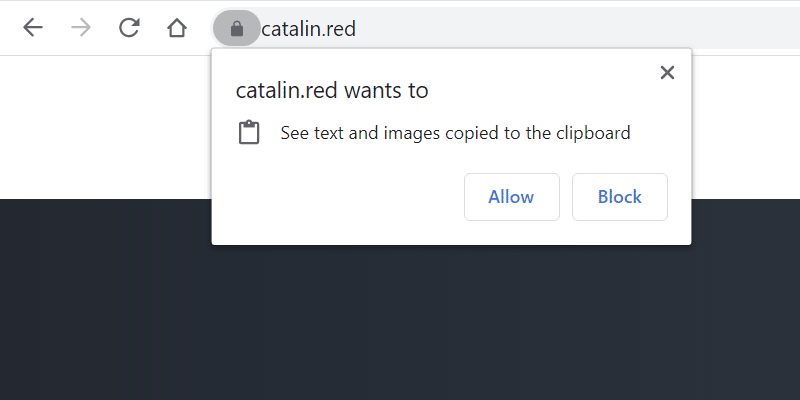
<p>On security and permissions, the write permission is granted automatically but when it comes to the read permission, that must be requested specifically.</p>

<p><img src="/dist/uploads/2020/01/browser-permission-prompt-read-clipboard.png" alt="The browser permission prompt to read the clipboard" /></p>

<p>Read more on the interaction with the clipboard, including both write and read operations:</p>
<ul>
  <li><a href="https://www.w3.org/TR/clipboard-apis/">Clipboard API and events</a></li>
  <li><a href="https://developers.google.com/web/updates/2018/03/clipboardapi">Unblocking Clipboard Access</a></li>
  <li><a href="https://developer.mozilla.org/en-US/docs/Mozilla/Add-ons/WebExtensions/Interact_with_the_clipboard">Interact with the clipboard</a></li>
</ul>

<h2 id="browser-support">Browser support</h2>

<p>The browser support for the code above is strictly related to supporting Clipboard API in your browser because as <a href="https://caniuse.com/#feat=mdn-api_clipboard">Caniuse data</a> shows, if the browser supports Clipboard API then most probably has support for JS async functions too.</p>

<p>If you’re targeting wider browser support for copying to clipboard, you may use <a href="https://clipboardjs.com/">clipboard.js</a>, which is a 3KB gzipped library, based on both Selection and execCommand APIs and offers very good support for legacy browsers.</p>

<p><img src="/dist/uploads/2020/01/clipboardjs-browser-support.png" alt="The browser permission prompt to read the clipboard" /></p>]]></content><author><name>Red</name></author><category term="HTML" /><category term="CSS" /><category term="JS" /><summary type="html"><![CDATA[Find out how to copy to the clipboard using JS and the modern asynchronous Clipboard API.]]></summary></entry><entry><title type="html">CSS resize none on textarea is bad for UX</title><link href="https://catalin.red/css-resize-none-is-bad-for-ux/" rel="alternate" type="text/html" title="CSS resize none on textarea is bad for UX" /><published>2019-12-16T10:00:00+00:00</published><updated>2019-12-16T10:00:00+00:00</updated><id>https://catalin.red/css-resize-none-is-bad-for-ux</id><content type="html" xml:base="https://catalin.red/css-resize-none-is-bad-for-ux/"><![CDATA[<p>For whatever reason, people seem to be passionate about removing the <code class="language-plaintext highlighter-rouge">textarea</code> resize handle using the CSS <code class="language-plaintext highlighter-rouge">resize: none</code> declaration. Also, GitHub says there are <a href="https://github.com/search?q=%22resize%3Anone%22+textarea&amp;type=Code">more than 3 million code results</a> in the wild for <code class="language-plaintext highlighter-rouge">textarea</code> with CSS <code class="language-plaintext highlighter-rouge">resize:none</code> applied.</p>

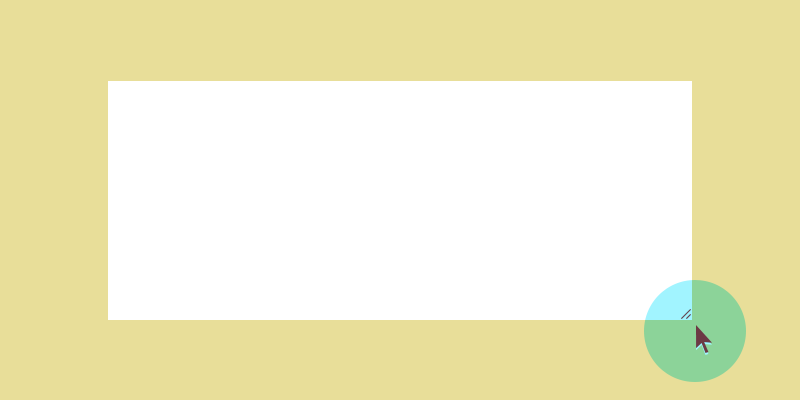
<p><img src="/dist/uploads/2019/12/css-resize-none-textarea-bad-ux.png" alt="A resizable textarea element" /></p>

<!-- more -->

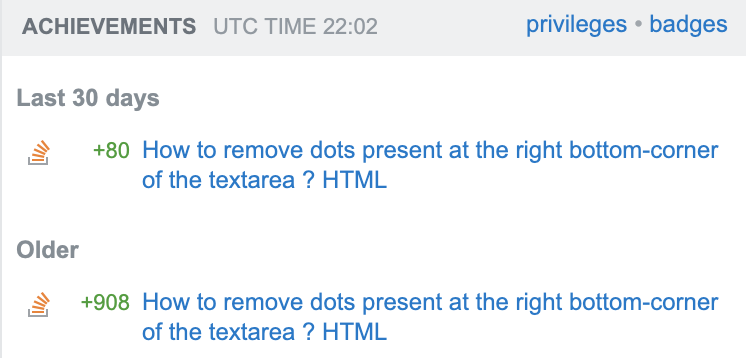
<p>I’m on Stack Overflow and feel kind of embarrassed about building reputation on recommending other people in the past to use CSS <code class="language-plaintext highlighter-rouge">resize: none</code> on <code class="language-plaintext highlighter-rouge">textarea</code>s. I’m not a power user but back in 2011, I did post an <a href="https://stackoverflow.com/questions/6340545/how-to-remove-dots-present-at-the-right-bottom-corner-of-the-textarea-html/6340594#6340594">answer on Stack Overflow</a> on removing the <em>bottom-right corner dots</em> in a <code class="language-plaintext highlighter-rouge">textarea</code>. Also, the thing is that I still keep getting Stack Overflow reputation on that answer.</p>

<p><img src="/dist/uploads/2019/12/stackoverflow-reputation-css-resize-none.png" alt="Stack Overflow reputation on CSS resize none" /></p>

<p>Never start an answer with <em>just</em> and never recommend other people to use CSS <code class="language-plaintext highlighter-rouge">resize: none</code> in their stylesheets. You can do better than me!</p>

<h2 id="css-resizenone-on-textarea-is-bad-ux">CSS <code class="language-plaintext highlighter-rouge">resize:none</code> on <code class="language-plaintext highlighter-rouge">textarea</code> is bad UX</h2>

<p>I think using the CSS <code class="language-plaintext highlighter-rouge">resize:none</code> declaration on a <code class="language-plaintext highlighter-rouge">textarea</code> is a bad decision when it comes to the user experience (UX) overall.</p>

<p>Very often, the <code class="language-plaintext highlighter-rouge">textarea</code> is limited to a number of rows and columns or it has fixed <code class="language-plaintext highlighter-rouge">width</code> and <code class="language-plaintext highlighter-rouge">height</code> defined via CSS. Based solely on my own experience, while answering to forums, writing contact forms on websites, filling live chat <em>popups</em> or even private messaging on Twitter this is very frustrating.</p>

<p>Sometimes you need to type a long reply that consists of many paragraphs and wrapping that text within a tiny textarea box makes it hard to understand and to follow as you type. There were many times when I had to write that text within Notepad++ for example and then just paste the whole reply in that small textarea. I admit I also opened the DevTools to override the <code class="language-plaintext highlighter-rouge">resize: none</code> declaration but that’s not really a productive way to do things.</p>

<h2 id="the-css-resize">The CSS resize</h2>

<p>According to <a href="https://developer.mozilla.org/en-US/docs/Web/CSS/resize">MDN</a>, the resize CSS property sets whether an element is resizable, and if so, in which directions. Also, it’s important to keep in mind that the <code class="language-plaintext highlighter-rouge">resize</code> property does not apply to the inline elements and block elements for which the overflow property is set to <code class="language-plaintext highlighter-rouge">visible</code>.</p>

<p>The CSS <code class="language-plaintext highlighter-rouge">resize</code> property is often applied to <code class="language-plaintext highlighter-rouge">textarea</code> in order to disable its resizability and this is what this article is about. I felt like an inner contradiction considering the amount of reputation I keep getting on my above Stack Overflow answer while finding on my own this bad UX. Besides that, it looks like the number of GitHub code results on this matter is growing, from 2 millions in 2017 as found by <a href="https://twitter.com/humphd/status/911287694550028288">@humphd</a> to more than 3 millions two years later.</p>

<h2 id="auto-height-textareas">Auto height <code class="language-plaintext highlighter-rouge">textarea</code>s</h2>

<p>A common scenario is to have an auto-height <code class="language-plaintext highlighter-rouge">textarea</code> element which basically expands as you type new rows. On this matter, Chris Ferdinandi wrote a good article on how to <a href="https://gomakethings.com/automatically-expand-a-textarea-as-the-user-types-using-vanilla-javascript/">expand a textarea as the user types</a>.</p>

<p>But besides the above, I’ve seen lots of JS hacks that involve using the CSS <code class="language-plaintext highlighter-rouge">resize: none</code> declaration. There are alternatives to simulate the ‘textarea’ behavior and a popular one is using the classic <code class="language-plaintext highlighter-rouge">div</code> with the boolean <code class="language-plaintext highlighter-rouge">contentEditable</code> attribute value set to <code class="language-plaintext highlighter-rouge">true</code>.</p>

<figure class="highlight"><pre><code class="language-html" data-lang="html">  <span class="nt">&lt;div</span> <span class="na">contentEditable=</span><span class="s">"true"</span><span class="nt">&gt;&lt;/div&gt;</span></code></pre></figure>

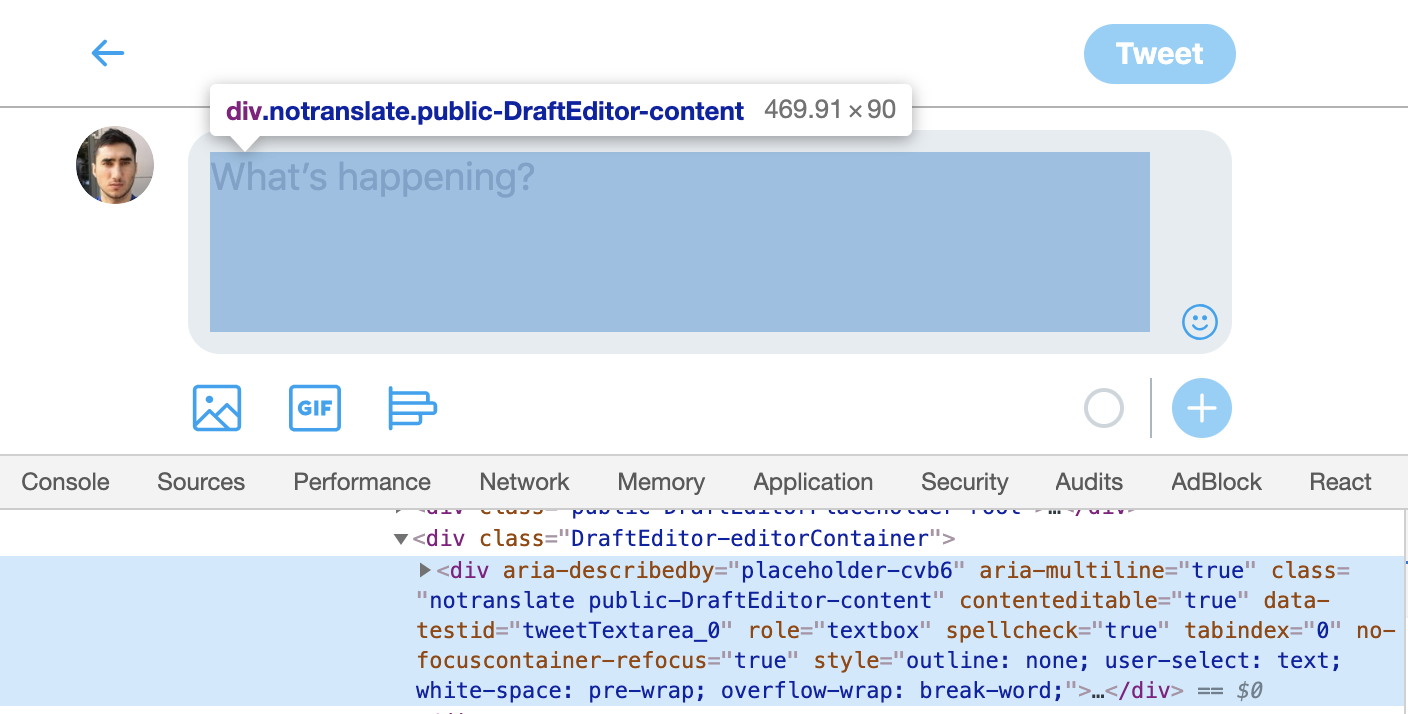
<p>Here’s a more detailed and hopefully accessible example using ARIA roles on Twitter’s mobile version:</p>

<p><img src="/dist/uploads/2019/12/mobile-twitter-aria-roles.png" alt="DevTools ARIA roles on mobile Twitter" /></p>

<h2 id="fancy-live-chats-aka-resize-none-everywhere">Fancy live chats a.k.a <code class="language-plaintext highlighter-rouge">resize: none</code> everywhere</h2>

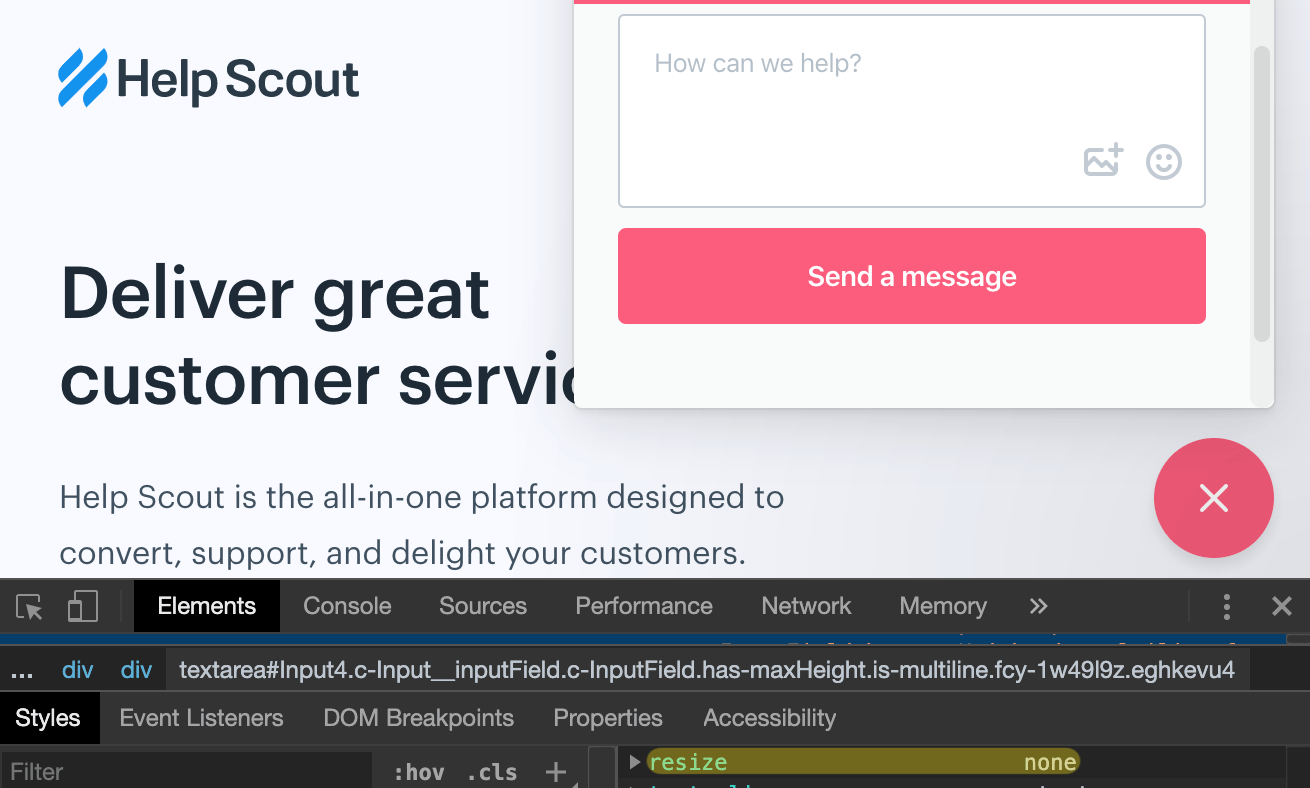
<p>Because it’s a fancy new live chat widget and it’s a really high competition out there, everyone wants the most visually pleasing, catchy and cool box where to send a message from.</p>

<p>While most live chat apps use the classic HTML <code class="language-plaintext highlighter-rouge">textarea</code> element, the implementations mostly rely on having listeners and adjust the CSS <code class="language-plaintext highlighter-rouge">height</code> style based on the text contained within the box, with <code class="language-plaintext highlighter-rouge">resize: none</code> declaration remaining, unfortunately, a constant presence in the CSS.</p>

<p><img src="/dist/uploads/2019/12/helpscout-textarea-resize-none.png" alt="Help Scout uses CSS resize none for the chat widget textarea" /></p>

<p>So, why <code class="language-plaintext highlighter-rouge">resize: none</code> is so popular in this case?</p>

<p>To answer myself here, maybe if I’d have to write code for a popular live chat app, I wouldn’t want a textarea resize handle to ruin my beautiful component design freshly imported from Figma. Would I?</p>

<p>I guess I’d stick with <code class="language-plaintext highlighter-rouge">resize: vertical</code> at the least, instead of ruining everything with <code class="language-plaintext highlighter-rouge">resize: none</code>. Šime Vidas also <a href="https://twitter.com/simevidas/status/1208477788686241798">tweeted</a> that <code class="language-plaintext highlighter-rouge">resize: vertical</code> is robust enough, and it’s cross browser.</p>

<h2 id="conclusion">Conclusion</h2>

<p>You must really hate your users if <code class="language-plaintext highlighter-rouge">textarea {resize: none}</code> is in your stylesheets. CSS resize none is bad for UX and you already know it:</p>

<blockquote class="twitter-tweet"><p lang="en" dir="ltr">Websites (<a href="https://twitter.com/UserVoice?ref_src=twsrc%5Etfw">@Uservoice</a>) that add resize: none; to their textarea&#39;s. I don&#39;t want to deal with excessive word wrapping, getting 4 words per line on my 24 inch monitor. Why are you so worried about me doing that, that you add this CSS rule? <a href="https://twitter.com/SuckyUX1?ref_src=twsrc%5Etfw">@SuckyUX1</a></p>&mdash; Richard M Boos (@richboos) <a href="https://twitter.com/richboos/status/1113487847150039041?ref_src=twsrc%5Etfw">April 3, 2019</a></blockquote>

<blockquote class="twitter-tweet"><p lang="en" dir="ltr"><a href="https://twitter.com/AngelListCare?ref_src=twsrc%5Etfw">@AngelListCare</a> can you remove resize: none and increase default height on textarea in /inbound messages when you are talking to candidates as a startup? It&#39;s TOO SMALL.</p>&mdash; Mev-Rael (@Mevrael) <a href="https://twitter.com/Mevrael/status/1004284049320546304?ref_src=twsrc%5Etfw">June 6, 2018</a></blockquote>

<blockquote class="twitter-tweet"><p lang="en" dir="ltr"><a href="https://twitter.com/hashtag/css?src=hash&amp;ref_src=twsrc%5Etfw">#css</a> There&#39;s a website I use often that, for text boxes, has &quot;resize: none&quot; enabled for the TEXTAREA. Since the text box is really small, is there a way disable this on the domain entirely instead of doing it page by page? <a href="https://t.co/fh6ITQqdFp">https://t.co/fh6ITQqdFp</a></p>&mdash; Dzmitry Radkevich (@gradar) <a href="https://twitter.com/gradar/status/996791993794691073?ref_src=twsrc%5Etfw">May 16, 2018</a></blockquote>

<blockquote class="twitter-tweet"><p lang="en" dir="ltr">next time I see a website with &quot;resize: none&quot; in their CSS for a textarea I expect a two page essay what the thought process behind it was</p>&mdash; Alexander Prinzhorn (@Prinzhorn) <a href="https://twitter.com/Prinzhorn/status/966954666721505280?ref_src=twsrc%5Etfw">February 23, 2018</a></blockquote>

<blockquote class="twitter-tweet"><p lang="en" dir="ltr">Dear <a href="https://twitter.com/PeoplePerHour?ref_src=twsrc%5Etfw">@PeoplePerHour</a>, if you&#39;re going to give me a really small textarea where I&#39;m likely going to want to write a few paragraphs, at least remove the `resize:none` CSS so I can make it bigger myself. Cheers. 🤔 <a href="https://t.co/iva97ezXQt">pic.twitter.com/iva97ezXQt</a></p>&mdash; Luke Harrison (@WebDevLuke) <a href="https://twitter.com/WebDevLuke/status/934917818881052672?ref_src=twsrc%5Etfw">November 26, 2017</a></blockquote>

<blockquote class="twitter-tweet"><p lang="en" dir="ltr">Putting `resize: none;` on a &lt;textarea&gt; is criminal behaviour. And yet &quot;Showing 1,960,901 available code results&quot; <a href="https://t.co/kCXhfz7MzM">https://t.co/kCXhfz7MzM</a></p>&mdash; David Humphrey (@humphd) <a href="https://twitter.com/humphd/status/911287694550028288?ref_src=twsrc%5Etfw">September 22, 2017</a></blockquote>

<blockquote class="twitter-tweet"><p lang="en" dir="ltr">you can explain to the web department that a textarea should never have a &quot;resize:none;&quot; property :)</p>&mdash; Louis Hoebregts (@Mamboleoo) <a href="https://twitter.com/Mamboleoo/status/741231266692014080?ref_src=twsrc%5Etfw">June 10, 2016</a></blockquote>

<script async="" src="https://platform.twitter.com/widgets.js" charset="utf-8"></script>]]></content><author><name>Red</name></author><category term="HTML" /><category term="UX" /><category term="CSS" /><summary type="html"><![CDATA[Some people decide to remove the textarea resize handle using the CSS resize none declaration and that is a bad thing for UX.]]></summary></entry><entry><title type="html">An SEO story on the website name from the Google SERP</title><link href="https://catalin.red/website-name-google-serp/" rel="alternate" type="text/html" title="An SEO story on the website name from the Google SERP" /><published>2019-04-22T10:00:00+00:00</published><updated>2019-04-22T10:00:00+00:00</updated><id>https://catalin.red/website-name-google-serp</id><content type="html" xml:base="https://catalin.red/website-name-google-serp/"><![CDATA[<p>Or what happens when you don’t specify a website name within the <code class="language-plaintext highlighter-rouge">title</code> tag, then Google grabs one for you from your <code class="language-plaintext highlighter-rouge">h1</code>, later on you switch to a new domain and get stuck with the old website name. Oh and that’s because you didn’t add a website name this time either.</p>

<p><img src="/dist/uploads/2019/04/website-name-google-serp.png" alt="Website name within the Google SERP" /></p>

<!-- more -->

<h2 id="what-is-serp-when-it-comes-to-seo">What is SERP when it comes to SEO?</h2>

<p>A Search Engine Results Page (SERP) is the list of results returned by a search engine as a response to a user’s query. For the sake of brevity, the term SERP is often used by the people in the SEO industry.</p>

<p>Also, the upper part of the first page of SERP is where your website pages have to be in order to receive higher traffic from a search engine.</p>

<h2 id="google-chooses-which-titles-to-display-in-search-results">Google chooses which titles to display in search results</h2>

<p>So we know that Google changes the SERP result title depending on your search query, the reason is to show you, the searcher, the best content result based on your query.</p>

<p>Here’s Matt Cutts in a video in which he explains how <a href="https://www.youtube.com/watch?v=L3HX_8BAhB4">Google chooses which titles to display in search results</a>, it’s from 2014, but thought it’s relevant now too, given this article’s topic.</p>

<h2 id="the-story">The story</h2>

<p>I <a href="/switch-red-team-design-to-catalin-red/">updated my website</a> back in November 2017, from <code class="language-plaintext highlighter-rouge">red-team-design.com</code> to <code class="language-plaintext highlighter-rouge">catalin.red</code>. Later on, while performing the usual double-check queries on Google, I noticed that the Google SERP was still showing obsolete title references containing the old domain website name:</p>

<p><img src="/dist/uploads/2019/04/google-serp-result-mastodon.png" alt="My Mastodon article in the Google SERP" /></p>

<p><em>A Google SERP example with one of my website’s article, containing the old website name.</em></p>

<p><img src="/dist/uploads/2019/04/catalin-red-google-query.png" alt="catalin.red query in the Google SERP" /></p>

<p><em>Another SERP result with the “catalin.red” query, “Red Team Design” strikes again.</em></p>

<p>So I did what a normal person would do in this case. I went to Google Search Console -&gt; URL inspection -&gt; Crawled page tool preview for my above URL in question at that time and noticed there’s no website name in there, no “Red Team Design” or anything else.</p>

<p><img src="/dist/uploads/2019/04/google-search-console-preview.png" alt="Google Search Console inspect URL preview" /></p>

<p>In the meantime, I’ve also tested other search engines as Duckduckgo or Bing and randomly got kind of similar results which meant to me that they use a similar algorithm for storing / getting the website name from within the HTML page source.</p>

<p>I waited and waited but I’ve not seen any noticeable update in the SERP for my website pages and I proceeded further to adding the new website name back to my pages.</p>

<figure class="highlight"><pre><code class="language-html" data-lang="html"><span class="nt">&lt;title&gt;</span>I inspected the mastodon.social website - Catalin Red<span class="nt">&lt;/title&gt;</span></code></pre></figure>

<p>I’ve noticed the <code class="language-plaintext highlighter-rouge">title</code>s were looking as they should in the SERP so apparently, <em>overriding</em> the website name in the title was the winner to say so.</p>

<p>Later on, in April I met <a href="https://twitter.com/JohnMu/">John Muller</a>, from Google Search Console, at SMX Munchen and I took advantage of the opportunity and <a href="https://twitter.com/catalinred/status/1113457168030814208">asked him about this matter</a> of mine. He was kind enough to answer to some of my questions and as far as I understood, Google stores a website name for your website and based on the fact that Google changes the SERP result title depending on your search query, I was seeing the old website name that Google kept stored.</p>

<p>I guess I was too ignorant about this SEO title matter, but learned lots of things along the way. For example, when Google grabs the website name for you, I can only assume it transforms the respective string from <a href="https://en.wikipedia.org/wiki/Camel_case">camelCase / PascalCase to Title case</a> where appropriate. I stalked, I mean <a href="https://twitter.com/catalinred/status/1116721640874893313">I met John again</a> at Brighton, later in April 2019, and he confirmed that Google indeed tries that for your website name but it depends a lot of the website name in question.</p>

<h2 id="conclusion">Conclusion</h2>

<p>In the end, having all my <a href="https://github.com/catalinred/catalinred.github.com/">website’s code on Github</a>, I was able to go back in time and build a sort of commits timeline related to this website name story of mine. Here’s a rough timeline attempt below, just in case:</p>

<h3 id="initial-commit">Initial commit</h3>
<p>This is <a href="https://github.com/catalinred/catalinred.github.com/commit/5222844d8b39a5c13254b32804c8a406f0a81e7f#diff-aeb42283af8ef8e9da40ededd3ae2ab2R1">the first GitHub commit</a> with my website name stored in a <a href="https://yaml.org/">YAML</a> config file, back in 2014.</p>

<figure class="highlight"><pre><code class="language-yaml" data-lang="yaml"><span class="na">name</span><span class="pi">:</span> <span class="s">RedTeamDesign</span></code></pre></figure>

<p>Having the above in the config file, according to the <a href="https://jekyllrb.com/docs/configuration/">Jekyll documentation</a>, you can later use it within your templates using <code class="language-plaintext highlighter-rouge">site.name</code>.</p>

<figure class="highlight"><pre><code class="language-html" data-lang="html"><span class="nt">&lt;h1</span> <span class="na">class=</span><span class="s">"title"</span><span class="nt">&gt;&lt;a</span> <span class="na">href=</span><span class="s">"/"</span><span class="nt">&gt;</span>{{ site.name }}<span class="nt">&lt;/a&gt;&lt;/h1&gt;</span></code></pre></figure>

<p>So that’s <a href="https://github.com/catalinred/catalinred.github.com/commit/5222844d8b39a5c13254b32804c8a406f0a81e7f#diff-2c19d9859b055d0302043d0fa2833e3fR20">what I did at that time</a>, I added my <em>ugly-but-unique</em> <code class="language-plaintext highlighter-rouge">RedTeamDesign</code> website name to an <code class="language-plaintext highlighter-rouge">h1</code>. Later on, Google <em>beautified</em> and stored it as <code class="language-plaintext highlighter-rouge">Red Team Design</code> by only using capital letters for the principal words. a.k.a <em>Title case</em>.</p>

<hr />

<h3 id="logo-with-css-image-replacement">Logo with CSS image replacement</h3>

<p>After the initial init, <a href="https://github.com/catalinred/catalinred.github.com/commit/ac3faeddc92a663d0d0fd1d483d3321d35e69b76#diff-2c19d9859b055d0302043d0fa2833e3fR47">I added a custom logo</a> using the CSS image replacement technique. But I guess at that time Google already had the website name stored from within the h1, as in the initial above commit.</p>

<figure class="highlight"><pre><code class="language-html" data-lang="html"><span class="nt">&lt;a</span> <span class="na">href=</span><span class="s">"/"</span> <span class="na">class=</span><span class="s">"rtd-logo"</span><span class="nt">&gt;</span>
  {{ site.name }}
<span class="nt">&lt;/a&gt;</span></code></pre></figure>

<hr />

<h3 id="svg-logo">SVG logo</h3>

<p>In autumn 2017, I replaced the <code class="language-plaintext highlighter-rouge">site.name</code> <a href="https://github.com/catalinred/catalinred.github.com/commit/c044a6028fbf4b4854cc318a7b1b53a35a28ca92#diff-aeb42283af8ef8e9da40ededd3ae2ab2">with Catalin Red</a> and I also <a href="https://github.com/catalinred/catalinred.github.com/commit/b36becb4997be428bbf7ede475035104fcaa4a51?diff=unified#diff-2c19d9859b055d0302043d0fa2833e3fL29">updated the logo</a> from using the CSS image replacement technique to an inline SVG with an <code class="language-plaintext highlighter-rouge">aria-label</code> attribute.</p>

<figure class="highlight"><pre><code class="language-html" data-lang="html"><span class="nt">&lt;a</span> <span class="na">href=</span><span class="s">"/"</span> <span class="na">aria-label=</span><span class="s">"{{ site.name }} logo"</span><span class="nt">&gt;</span>
  <span class="nt">&lt;svg</span> <span class="na">viewBox=</span><span class="s">"..."</span><span class="nt">&gt;</span>
    <span class="nt">&lt;polyline</span> <span class="na">points=</span><span class="s">"..."</span><span class="nt">/&gt;</span>
    <span class="nt">&lt;polyline</span> <span class="na">points=</span><span class="s">"..."</span><span class="nt">/&gt;</span>
    <span class="nt">&lt;polyline</span> <span class="na">points=</span><span class="s">"..."</span><span class="nt">/&gt;</span>
  <span class="nt">&lt;/svg&gt;</span>
<span class="nt">&lt;/a&gt;</span></code></pre></figure>

<hr />

<h3 id="the-end-of-the-story-">The end of the story 💥</h3>

<p>One year later, in 2018, <a href="https://github.com/catalinred/catalinred.github.com/commit/77b4f5e17146abd5931e52b2d7afd7b061717d89#diff-2c19d9859b055d0302043d0fa2833e3fR6">I added the website name</a> to the <code class="language-plaintext highlighter-rouge">title</code> tag and that did the trick and that’s the end of story.</p>

<figure class="highlight"><pre><code class="language-html" data-lang="html"> <span class="nt">&lt;title&gt;</span>{{ page.title | xml_escape }} - {{ site.title }}<span class="nt">&lt;/title&gt;</span></code></pre></figure>]]></content><author><name>Red</name></author><category term="SEO" /><category term="HTML" /><category term="CSS" /><summary type="html"><![CDATA[I didn't add a website name within the title tag for my website, then I switched to a new domain and Google was showing my old website name references in the SERP.]]></summary></entry><entry><title type="html">Fancy new selectors within groups can break your CSS rule</title><link href="https://catalin.red/fancy-new-selectors-can-break-your-css-rule/" rel="alternate" type="text/html" title="Fancy new selectors within groups can break your CSS rule" /><published>2019-02-21T10:00:00+00:00</published><updated>2019-02-21T10:00:00+00:00</updated><id>https://catalin.red/fancy-new-selectors-can-break-your-css-rule</id><content type="html" xml:base="https://catalin.red/fancy-new-selectors-can-break-your-css-rule/"><![CDATA[<p>I was working on enhancing a bit <a href="https://github.com/catalinred/animenu">my responsive dropdown menu</a> by adding the CSS <code class="language-plaintext highlighter-rouge">:focus-within</code> pseudo-class in order to tab through the dropdown menu items.</p>

<p>To avoid duplication, I thought it is a smart move to group this new fancy CSS <code class="language-plaintext highlighter-rouge">:focus-within</code> pseudo-class with an existing selector. It was beautiful and it looked a lot like a progressive enhancement but in the end, it broke the entire CSS rule within browsers that do not support the CSS <code class="language-plaintext highlighter-rouge">:focus-within</code>, e.g. IE.</p>

<p><img src="/dist/uploads/2019/02/fancy-new-css-selectors-can-break-your-rule.png" alt="CSS selectors within groups" /></p>

<!-- more -->

<h2 id="the-scenario">The scenario</h2>

<p><img src="/dist/uploads/2019/02/focus-within-caniuse.jpg" alt=":focus-within support on caniuse.com" /></p>

<p>Here’s the GitHub <a href="https://github.com/catalinred/animenu/commit/ede5f8bfcee80d8b54eba59b513e57291e401ab3#diff-dd393be4fd7c82e1bd62a934500aa19dL111">commit</a> in question, the <code class="language-plaintext highlighter-rouge">:focus-within</code> pseudo-class doesn’t work on IE, as the above CanIUse chart shows, thus the below CSS rule gets invalidated entirely <a href="https://www.w3.org/TR/2018/REC-selectors-3-20181106/#grouping">according to W3C specs</a>.</p>

<figure class="highlight"><pre><code class="language-css" data-lang="css"><span class="nc">.myEl</span><span class="o">,</span>
<span class="nc">.myEl</span><span class="nd">:focus-within</span> <span class="p">{</span>
  <span class="c">/* ... */</span>
<span class="p">}</span></code></pre></figure>

<blockquote>
  <p>If just one of these selectors were invalid, the entire group of selectors would be invalid.</p>
</blockquote>

<h2 id="the-fix">The fix</h2>

<p>I learned the lesson, <a href="https://github.com/catalinred/animenu/commit/21b7ae23efeec6cba1ec8aeae495e206b58b529f">fixed the CSS selectors</a> and wrote this down. Also, you might like the article I wrote on <a href="/visually-validate-input-using-css/">how to visually validate an input field</a> using <code class="language-plaintext highlighter-rouge">:placeholder-shown</code> and <code class="language-plaintext highlighter-rouge">:focus-within</code>.</p>]]></content><author><name>Red</name></author><category term="CSS" /><summary type="html"><![CDATA[Fancy new selectors within groups can break your CSS rule if just one of these selectors is invalid or if the browser doesn't recognize it.]]></summary></entry><entry><title type="html">The 3-in-1 full-stack developer</title><link href="https://catalin.red/the-3-in-1-full-stack-developer/" rel="alternate" type="text/html" title="The 3-in-1 full-stack developer" /><published>2019-02-18T10:00:00+00:00</published><updated>2019-02-18T10:00:00+00:00</updated><id>https://catalin.red/the-3-in-1-full-stack-developer</id><content type="html" xml:base="https://catalin.red/the-3-in-1-full-stack-developer/"><![CDATA[<p>I attended a presentation at a local university in my hometown and I gave a small talk on web design and development topics. The main discussion focus was about the junior students and their path to becoming developers and perhaps future colleagues.</p>

<p>The meeting was cool, a success, not the first I was attending, but one question a student asked stuck in my mind and especially the answer that another speaker gave to that specific question.</p>

<p><img src="/dist/uploads/2019/02/3-in-1-full-stack-developer.png" alt="3-in-1 full-stack developer" /></p>

<!-- more -->

<blockquote>
  <p>Q- “What’s the difference between a front-end and a full-stack developer?”</p>
</blockquote>

<blockquote>
  <p>A- “Well, think about a full-stack developer as a 3-in-1 person who can serve as a backend, a front-end and a DevOps”.</p>
</blockquote>

<h2 id="ok-">OK 😑</h2>

<p>Well, hearing this <em>3-in-1</em> wording was weird, at least, especially when having <a href="https://twitter.com/jakevdp/status/1062342018758696960">this</a> in mind, or <a href="https://twitter.com/holtbt/status/977419276251430912">this</a>. But what do I know, I’m a front-end developer, sorry, web developer… I mean I sometimes do websites, when I’m not ranting.</p>

<p>I felt like I had to write this happening down but there are some good articles on this matter in the wild and I strongly advise to go read them:</p>

<ul>
  <li><a href="http://bradfrost.com/blog/post/full-stack-developers/">Full-stack developers</a> by Brad Frost</li>
  <li><a href="http://www.heydonworks.com/article/reluctant-gatekeeping-the-problem-with-full-stack">The problem with full-stack</a> by Heydon Pickering</li>
</ul>]]></content><author><name>Red</name></author><category term="JS" /><category term="HTML" /><category term="Miscellaneous" /><summary type="html"><![CDATA[The 3-in-1 full-stack developer wording is weird, at least.]]></summary></entry><entry><title type="html">SVG icon system within Pug/Jade</title><link href="https://catalin.red/svg-icon-system-within-pug/" rel="alternate" type="text/html" title="SVG icon system within Pug/Jade" /><published>2019-01-29T10:00:00+00:00</published><updated>2019-01-29T10:00:00+00:00</updated><id>https://catalin.red/svg-icon-system-within-pug</id><content type="html" xml:base="https://catalin.red/svg-icon-system-within-pug/"><![CDATA[<p>I’m working on a project that uses Node.js and Pug, formerly Jade, to generate a static website and I couldn’t be more happy about how this works.</p>

<p>Still, one thing was bothering me for some time, and namely how to efficiently include a minified, production-ready SVG icon system, using <code class="language-plaintext highlighter-rouge">symbol</code>s within the Pug pages.</p>

<p><img src="/dist/uploads/2019/01/pug-include-svg.png" alt="The Pug templating engine logo and a code snippet containing a SVG icon system with symbols" /></p>

<!-- more -->

<h2 id="tldr">TL;DR</h2>

<p>I had to find a better way to include an <strong>SVG icon system</strong>, both <strong>inline</strong> and <strong>minified</strong>, using <code class="language-plaintext highlighter-rouge">symbol</code>s within the Pug generated files.</p>

<ul>
  <li>I minified the <code class="language-plaintext highlighter-rouge">symbols.svg</code> output with <a href="https://github.com/imagemin/imagemin"><code class="language-plaintext highlighter-rouge">imagemin</code></a></li>
  <li>I read the resulted content and passed it to <a href="https://pugjs.org/">Pug</a> using the <code class="language-plaintext highlighter-rouge">locals</code> object.</li>
  <li>I inlined the already now minified SVG result in the source files using a <a href="https://pugjs.org/language/plain-text.html#block-in-a-tag">Pug dot block</a>.</li>
</ul>

<h2 id="the-struggle">The struggle</h2>

<p>The system that helps to generate the static files consists of <code class="language-plaintext highlighter-rouge">gulp</code>, <code class="language-plaintext highlighter-rouge">pug</code>, <code class="language-plaintext highlighter-rouge">sass</code>, <code class="language-plaintext highlighter-rouge">imagemin</code>, <code class="language-plaintext highlighter-rouge">uglify</code> and all the front-end buzzwords you can think of. Lots of buzzwords, I told you I know how to make websites.</p>

<p>Leaving the joke aside, Pug, formerly Jade, has a simple mechanism to <a href="https://pugjs.org/language/includes.html">include non-Pug files</a> as raw text and it works just fine.</p>

<figure class="highlight"><pre><code class="language-js" data-lang="js"><span class="nx">style</span>
  <span class="nx">include</span> <span class="nx">style</span><span class="p">.</span><span class="nx">css</span>

<span class="nx">script</span>
  <span class="nx">include</span> <span class="nx">script</span><span class="p">.</span><span class="nx">js</span>

<span class="nx">body</span>
  <span class="nx">include</span> <span class="nx">symbols</span><span class="p">.</span><span class="nx">svg</span></code></pre></figure>

<p>All good except the fact that if you choose to minify the Pug files output, e.g. when in <code class="language-plaintext highlighter-rouge">production</code>, if your included non-Pug files aren’t minified/uglified already, you’ll end up with some mixed output in your final HTML source file.</p>

<p><img src="/dist/uploads/2019/01/mixed-source-code.png" alt="Mixed HTML due to non-minified SVG code include" /></p>

<p><em>Mixed HTML code output, both minified and non-minified</em></p>

<p>In the beginning, I have to admit I started by having two files to maintain: <code class="language-plaintext highlighter-rouge">symbols.svg</code> and <code class="language-plaintext highlighter-rouge">symbols.min.svg</code> and whenever a new symbol was added to <code class="language-plaintext highlighter-rouge">symbols.svg</code>, had to update the <code class="language-plaintext highlighter-rouge">symbols.min.svg</code> file too. I’m not so proud of this, but it worked, and I knew I had to find a better way to handle this situation.</p>

<h2 id="my-take-on-this">My take on this</h2>

<p>New year, new ideas.</p>

<p>It’s not new year’s resolution or something like that, but the first thing I made when got back to work in 2019, besides updating the footers to © 2019 :), was to handle this SVG inline include in my Pug files.</p>

<p>Here’s how the <code class="language-plaintext highlighter-rouge">symbols.svg</code> icon system looks like:</p>

<figure class="highlight"><pre><code class="language-html" data-lang="html"><span class="nt">&lt;svg</span> <span class="na">xmlns=</span><span class="s">"http://www.w3.org/2000/svg"</span>
     <span class="na">width=</span><span class="s">"0"</span> <span class="na">height=</span><span class="s">"0"</span>
     <span class="na">display=</span><span class="s">"none"</span><span class="nt">&gt;</span>
  <span class="nt">&lt;symbol</span> <span class="na">id=</span><span class="s">"..."</span><span class="nt">&gt;</span>
    <span class="nt">&lt;title&gt;</span>...<span class="nt">&lt;/title&gt;</span>
    <span class="nt">&lt;path</span> <span class="na">d=</span><span class="s">"..."</span><span class="nt">/&gt;</span>
  <span class="nt">&lt;/symbol&gt;</span>
  <span class="nt">&lt;symbol</span> <span class="na">id=</span><span class="s">"..."</span><span class="nt">&gt;</span>
    <span class="nt">&lt;title&gt;</span>...<span class="nt">&lt;/title&gt;</span>
    <span class="nt">&lt;path</span> <span class="na">d=</span><span class="s">"..."</span><span class="nt">/&gt;</span>
  <span class="nt">&lt;/symbol&gt;</span>
   ...
<span class="nt">&lt;/svg&gt;</span></code></pre></figure>

<hr />

<h3 id="quick-tip">Quick tip</h3>
<p>The <code class="language-plaintext highlighter-rouge">display</code> attribute lets you control the rendering of graphical or container elements. No need to add any CSS class helper to visually hide the SVG content. More on <a href="https://developer.mozilla.org/en-US/docs/Web/SVG/Attribute/display">MDN</a>.</p>

<hr />

<p>The following gulp task excerpt will move and optimize the <code class="language-plaintext highlighter-rouge">symbols.svg</code>. Note the <a href="https://github.com/svg/svgo">SVGO</a> options that we’re passing on for our SVG, they are useful and mandatory in this case otherwise lots of stuff will get removed from the optimized output.</p>

<figure class="highlight"><pre><code class="language-js" data-lang="js"><span class="kd">const</span> <span class="nx">imagesTask</span> <span class="o">=</span> <span class="p">()</span> <span class="o">=&gt;</span> <span class="nx">gulp</span>
  <span class="p">.</span><span class="nx">src</span><span class="p">(</span><span class="dl">'</span><span class="s1">src/assets/img/**/*</span><span class="dl">'</span><span class="p">)</span>
  <span class="p">.</span><span class="nx">pipe</span><span class="p">(</span>
    <span class="nx">gulpif</span><span class="p">(</span><span class="nx">argv</span><span class="p">.</span><span class="nx">dist</span><span class="p">,</span> <span class="nx">imagemin</span><span class="p">([</span>
      <span class="nx">imagemin</span><span class="p">.</span><span class="nx">gifsicle</span><span class="p">(),</span>
      <span class="nx">imagemin</span><span class="p">.</span><span class="nx">jpegtran</span><span class="p">({</span> <span class="na">progressive</span><span class="p">:</span> <span class="kc">true</span> <span class="p">}),</span>
      <span class="nx">imagemin</span><span class="p">.</span><span class="nx">optipng</span><span class="p">(),</span>
      <span class="nx">imagemin</span><span class="p">.</span><span class="nx">svgo</span><span class="p">({</span>
        <span class="na">plugins</span><span class="p">:</span> <span class="p">[</span>
          <span class="p">{</span> <span class="na">removeHiddenElems</span><span class="p">:</span> <span class="kc">false</span> <span class="p">},</span>
          <span class="p">{</span> <span class="na">removeUnusedNS</span><span class="p">:</span> <span class="kc">false</span> <span class="p">},</span>
          <span class="p">{</span> <span class="na">removeUselessDefs</span><span class="p">:</span> <span class="kc">false</span> <span class="p">},</span>
          <span class="p">{</span> <span class="na">collapseGroups</span><span class="p">:</span> <span class="kc">false</span> <span class="p">},</span>
          <span class="p">{</span> <span class="na">cleanupIDs</span><span class="p">:</span> <span class="kc">false</span> <span class="p">},</span>
          <span class="p">{</span> <span class="na">removeEmptyContainers</span><span class="p">:</span> <span class="kc">false</span> <span class="p">}],</span>
      <span class="p">}),</span>
    <span class="p">])),</span>
  <span class="p">)</span>
  <span class="p">.</span><span class="nx">pipe</span><span class="p">(</span><span class="nx">gulp</span><span class="p">.</span><span class="nx">dest</span><span class="p">(</span><span class="dl">'</span><span class="s1">dist/assets/img</span><span class="dl">'</span><span class="p">));</span></code></pre></figure>

<p>Within the <code class="language-plaintext highlighter-rouge">pugTask</code>, I’m passing the already minified SVG file as a property of the <code class="language-plaintext highlighter-rouge">locals</code> object, which is part of the <a href="https://pugjs.org/api/getting-started.html">Pug API</a>. Also, I always make sure the above gulp <code class="language-plaintext highlighter-rouge">imagesTask</code> runs before the <code class="language-plaintext highlighter-rouge">pugTask</code>, in order to have the <code class="language-plaintext highlighter-rouge">locals.svg</code> available. As I just switched everything to <a href="https://www.npmjs.com/package/gulp">gulp 4</a>, I use <a href="https://gulpjs.com/docs/en/api/series">series()</a> to execute tasks one after another.</p>

<figure class="highlight"><pre><code class="language-js" data-lang="js"><span class="kd">const</span> <span class="nx">pugTask</span> <span class="o">=</span> <span class="p">()</span> <span class="o">=&gt;</span> <span class="nx">gulp</span>
  <span class="p">.</span><span class="nx">src</span><span class="p">([</span><span class="dl">'</span><span class="s1">src/views/**/*.pug</span><span class="dl">'</span><span class="p">])</span>
  <span class="p">.</span><span class="nx">pipe</span><span class="p">(</span>
    <span class="nx">gulpif</span><span class="p">(</span><span class="nx">argv</span><span class="p">.</span><span class="nx">dist</span><span class="p">,</span>
      <span class="nx">pug</span><span class="p">({</span>
        <span class="na">pretty</span><span class="p">:</span> <span class="kc">false</span><span class="p">,</span>
        <span class="na">compileDebug</span><span class="p">:</span> <span class="kc">true</span><span class="p">,</span>
        <span class="na">locals</span><span class="p">:</span> <span class="p">{</span>
          <span class="na">svg</span><span class="p">:</span> <span class="nx">fs</span><span class="p">.</span><span class="nx">readFileSync</span><span class="p">(</span><span class="dl">'</span><span class="s1">dist/assets/img/svg/symbols.svg</span><span class="dl">'</span><span class="p">,</span> <span class="dl">'</span><span class="s1">utf8</span><span class="dl">'</span><span class="p">),</span>
        <span class="p">},</span>
        <span class="na">basedir</span><span class="p">:</span> <span class="dl">'</span><span class="s1">src</span><span class="dl">'</span><span class="p">,</span>
      <span class="p">})),</span>
  <span class="p">)</span>
  <span class="p">.</span><span class="nx">on</span><span class="p">(</span><span class="dl">'</span><span class="s1">error</span><span class="dl">'</span><span class="p">,</span> <span class="p">(</span><span class="nx">err</span><span class="p">)</span> <span class="o">=&gt;</span> <span class="p">{</span>
    <span class="nx">console</span><span class="p">.</span><span class="nx">log</span><span class="p">(</span><span class="nx">err</span><span class="p">.</span><span class="nx">toString</span><span class="p">());</span>
    <span class="k">this</span><span class="p">.</span><span class="nx">emit</span><span class="p">(</span><span class="dl">'</span><span class="s1">end</span><span class="dl">'</span><span class="p">);</span>
  <span class="p">})</span>
  <span class="p">.</span><span class="nx">pipe</span><span class="p">(</span><span class="nx">gulp</span><span class="p">.</span><span class="nx">dest</span><span class="p">(</span><span class="dl">'</span><span class="s1">dist</span><span class="dl">'</span><span class="p">));</span></code></pre></figure>

<p>Finally, I’ll be able to include the minified result in a partial Pug file using a dot block of plain text and unescaped string interpolation:</p>

<figure class="highlight"><pre><code class="language-js" data-lang="js"><span class="p">.</span>
  <span class="o">!</span><span class="p">{</span><span class="nx">locals</span><span class="p">.</span><span class="nx">svg</span><span class="p">}</span></code></pre></figure>

<h3 id="from-pug-docs">From Pug docs:</h3>
<ul>
  <li><a href="https://pugjs.org/language/plain-text.html#block-in-a-tag">Block in a tag</a></li>
  <li><a href="https://pugjs.org/language/interpolation.html#string-interpolation-unescaped">String interpolation unescaped</a></li>
</ul>

<h2 id="thats-it">That’s it!</h2>

<p><img src="/dist/uploads/2019/01/minified-source-code.png" alt="Minified HTML containing minified SVG code" /></p>

<p><em>Better, beautiful &amp; minified HTML output</em></p>

<p>I’m pretty happy I managed to find a way to improve this piece within my build process and will dig even further to see how to improve things. Let me know if you know a better way to do it, would love to hear it!</p>]]></content><author><name>Red</name></author><category term="SVG" /><category term="JS" /><category term="HTML" /><category term="Miscellaneous" /><summary type="html"><![CDATA[How to include a minified, production-ready SVG icon system, using symbols within the Pug/Jade pages.]]></summary></entry></feed>